
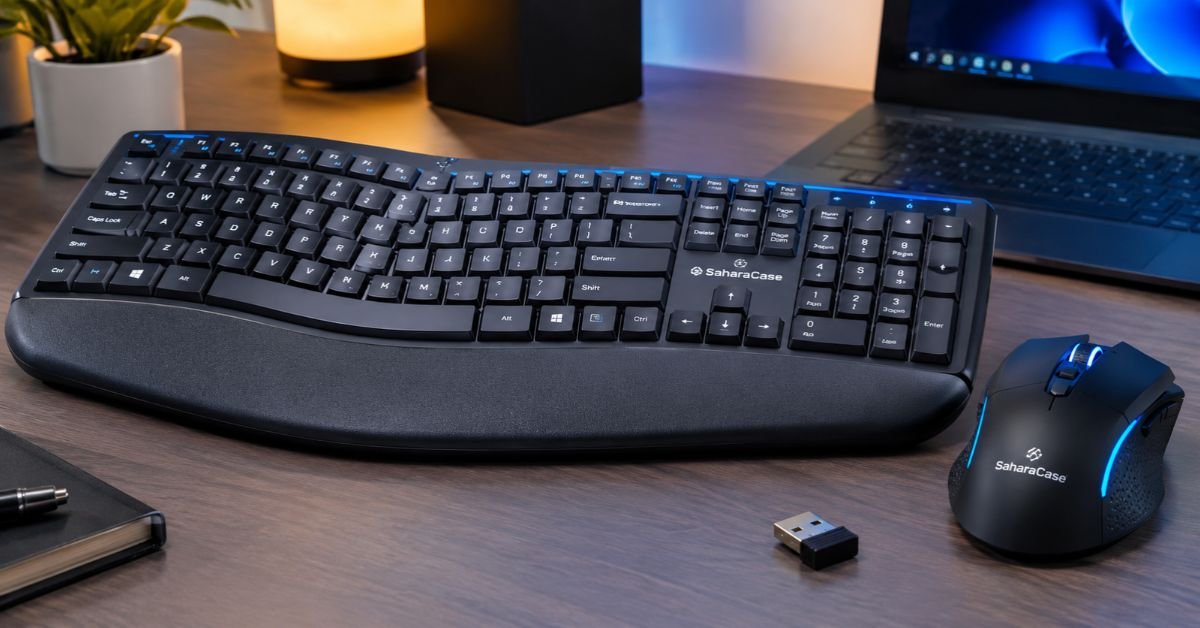
SaharaCase is better known for phone and tablet accessories than for desk gear. So when its wireless “gaming” keyboard and mouse bundle turns up at a retailer like Staples, it’s fair to ask what you’re really buying.
Here’s a plain look at the specs, how the set is likely to feel in daily use, what to do if it misbehaves, and who should look elsewhere.
What This Combo Is
It’s a full-size wireless keyboard paired with a contoured laser mouse, sold as one bundle. The two gaming-labeled versions are the KB19 and the KB20, both in black.
The retailer listings describe them this way:
- A 106-key layout with a number pad and function keys, plus a built-in phone holder
- A six-button mouse with three DPI settings, topping out at 1600
- A rechargeable build with silent keys and RGB lighting
- A 2.4 GHz connection through a USB receiver, with a stated range of about 33 feet and no software to install
That’s the whole pitch: a tidy, good-looking desk set that can handle some gaming without costing as much as a dedicated gaming setup.
KB19, KB20, and the Cheaper Color Combos
SaharaCase sells a lot of near-identical models, and the names blur together fast. This is how the ones I found line up at Staples.
| Model | Style | Listed Price | Notes |
| KB20 (Black) | Gaming, RGB | $99.95 | Rechargeable, silent RGB, six-button laser mouse, three DPI levels |
| KB19 (Black) | Gaming, RGB | $89.95 | Same core features, with a phone holder and 106 keys |
| KB12, KB17, KB18 | Colorful office sets | $49.95 | USB receiver, on/off switches, no gaming label |
| KB1 (Black/Gray) | Office set | $49.99 | Folding holder, anti-slip pads, number pad |
Prices move, so check the current number before you buy. Also, the listings don’t spell out what separates the KB19 from the KB20 beyond price, so read both full spec sheets side by side.
The Features, Without the Sales Language
“Ergonomic” Means Comfort, Not a Medical Layout
The keyboard is a standard full-size board. The comfort touches are a foldable stand or tilt, ergonomic keycaps, and a mouse shaped to sit naturally in your hand and cut down on fatigue over long sessions.
That’s helpful, but it’s not a split keyboard or a vertical mouse. If you have ongoing wrist or forearm problems, you’ll want something designed for that.
The Laser Mouse and DPI
DPI describes how far your cursor moves for a given hand movement. This mouse gives you three steps, up to 1600.
For browsing, spreadsheets, and relaxed gaming, that’s plenty. Many players settle between 800 and 1600 anyway. Dedicated gaming mice go far higher, but that extra range matters mostly to people who already know they want it.
Wireless Connection
The set uses a 2.4 GHz USB receiver rather than Bluetooth, which is usually the better choice for games because it tends to respond faster. You plug the receiver in and both devices connect, with no app or driver.
Rechargeable Power
The gaming versions recharge, so there are no AA batteries to replace. The cheaper color combos run on AA batteries, with listings promising months of use.
I couldn’t find a rated battery life for the rechargeable versions. Treat that as something to test yourself during the return window.
Is It Good for Gaming?
For casual and mid-range play, yes. For competitive shooters, probably not.
What works in its favor:
- The 2.4 GHz link avoids the lag you can get with Bluetooth
- Six mouse buttons give you room for extra binds in strategy games and MMOs
- The full-size layout keeps the number pad
- Quiet keys keep late-night sessions from bothering anyone nearby
What holds it back:
- 1600 DPI is the ceiling
- There’s no software, so no macros and no custom lighting profiles
- The listings don’t mention mechanical switches, so expect a standard quiet-key feel
- Nothing in the listings mentions anti-ghosting or N-key rollover, so some fast multi-key combinations may not register in every game
If you play Valorant or CS2 at a serious level, buy a mouse built for it. If your games are Minecraft, The Sims, Civilization, or single-player RPGs, this set should do the job.
See More: Blue Switches Keyboard: The Complete Buyer’s Guide
Pros and Cons
| Pros | Cons |
| One USB receiver covers both devices | 1600 DPI maximum |
| Rechargeable on the gaming models | No software or macro support |
| Full-size layout with number pad | “Gaming” claims come with little technical detail |
| Phone holder on the KB19 | Many similar models make shopping confusing |
| Quiet typing | Not a true split or tented ergonomic design |
Who Should Buy It
This set makes sense if you:
- Want one setup for work and some gaming
- Are tired of buying AA batteries
- Enter a lot of numbers and rely on the number pad
- Share a room and want quiet keys
Look elsewhere if you:
- Play competitive shooters
- Want macros, custom lighting, or onboard profiles
- Need a layout designed around wrist pain or repetitive strain
Setting It Up
It takes about two minutes:
- Charge both devices first if you bought a rechargeable model.
- Switch the keyboard and mouse on.
- Plug the USB receiver into your computer. A port directly on the machine is better than a hub.
- Wait a few seconds for Windows or macOS to recognize it.
- Press the DPI button on the mouse to cycle through the three speeds.
Fixing Common Problems
The keyboard or mouse won’t connect. Check that both power switches are on. Then try a port on the back of the PC, or a different port altogether. If that fails, restart the computer with the receiver already plugged in.
The cursor lags or stutters. Wireless interference is the usual cause. A short USB extension cable lets you move the receiver closer to the mouse and away from routers and USB 3.0 devices. Clean the sensor window with a dry cotton swab, and use a mouse pad instead of glass or a glossy desk.
Keys don’t register in games. First, run the keyboard through an online key tester to see whether the keys work at all. If only multi-key combinations fail, you’re probably hitting a rollover limit, not a defect. Rebinding the most demanding actions so they don’t need three or more keys at once usually fixes it.
The battery drains quickly. Turn both devices off when you’re not using them, and switch off the RGB lighting if the keyboard lets you. If the battery fades within the return window, exchange the unit.
How It Compares to a Basic Office Combo
| Feature | SaharaCase KB19/KB20 | Typical Office Combo (such as Logitech MK270 or MK345) |
| Connection | 2.4 GHz USB receiver | 2.4 GHz USB receiver |
| Power | Rechargeable | AA batteries |
| RGB lighting | Yes | Usually no |
| Mouse DPI | Up to 1600 | Often 1000 to 1600 |
| Software | None | Optional on some models |
The SaharaCase set’s advantages are rechargeability and lighting. It isn’t a performance upgrade.
Keeping It in Good Shape
- Recharge before the battery hits zero when you can
- Wipe the keycaps with a slightly damp microfiber cloth, never a soaked one
- Use a mouse pad to protect the laser sensor and the mouse feet
- Keep the USB receiver stored safely when you travel, since a lost receiver is a lost set
Final Verdict
The SaharaCase Wireless Ergonomic Gaming Keyboard and Laser Mouse Combo is a quiet, neat, RGB-lit bundle for people who work most of the day and play on the side. It’s not a competitive gaming kit, and it doesn’t pretend to be one in the details.
Judge it on comfort, convenience, and price. Test the multi-key response in your favorite game during the first week and check the return policy. You’ll know quickly whether it fits your desk.
Frequently Asked Questions
Best wireless keyboard and mouse combo for gaming?
Most combos are built for comfort, not competitive play. For serious gaming, a separate 2.4 GHz wireless gaming mouse and keyboard will beat any bundle. If you want a combo, choose one that connects through a 2.4 GHz USB receiver (not Bluetooth) and has an adjustable-DPI mouse. Casual players will be fine with a mid-range set, and shooter players should buy separate parts.
What is a good quality wireless keyboard and mouse combo?
Look for four things:
- A 2.4 GHz receiver with a stable connection
- A mouse with adjustable DPI
- Quiet, firm keys
- Battery life measured in months, or a rechargeable build
A strong brand name helps too, because warranty and replacements are easier.
What is the best brand for wireless keyboards?
Logitech is the safest all-round pick for reliability and availability. Razer, Corsair, and SteelSeries lead for gaming, and Keychron is popular for mechanical typing. On a tight budget, Rapoo and HP are workable.
What is the price of a mouse and keyboard combo in Pakistan?
Based on listings at one Pakistani retailer (W11stop, updated July to August 2026), prices run roughly like this:
| Tier | Example | Price |
| Budget | Marvo Scorpion DCM003WE | Rs. 2,040 |
| Budget | EASE EKM200 | Rs. 3,300 |
| Mid-range | Logitech MK275 | Rs. 6,380 |
| Premium | Rapoo 9300M (multi-mode) | Rs. 9,370 |
| Premium | HP 230 | Rs. 11,500 |
So expect about Rs. 2,000 to Rs. 11,500. Some listings show two different prices on the same page, so confirm at checkout. Prices change often.
What is a 100% gaming keyboard?
It’s a full-size keyboard with every key, usually about 104 to 108, including the number pad. The “100%” refers to layout size, not performance. Smaller formats like TKL (80%), 75%, 65%, and 60% drop keys to save desk space for mouse movement.
Related Articles
- Blue Switches Keyboard: The Complete Buyer’s Guide
- How Many Keys on a Full Size Keyboard? (2026 Guide)
- MageGee Keyboard Software (2026): Setup, Fixes & Driver
- Redragon EISA Magnetic Keyboard K686 Software: Setup, Rapid Trigger & Fine-Tuning Guide
- Cherry MX Keycaps Buying & Compatibility Guide (2026)
- How to Clean Keycaps Safely Without Ruining Plastics
- How to Lock Monitor Screen Fast (Windows, & Physical Locks)
