
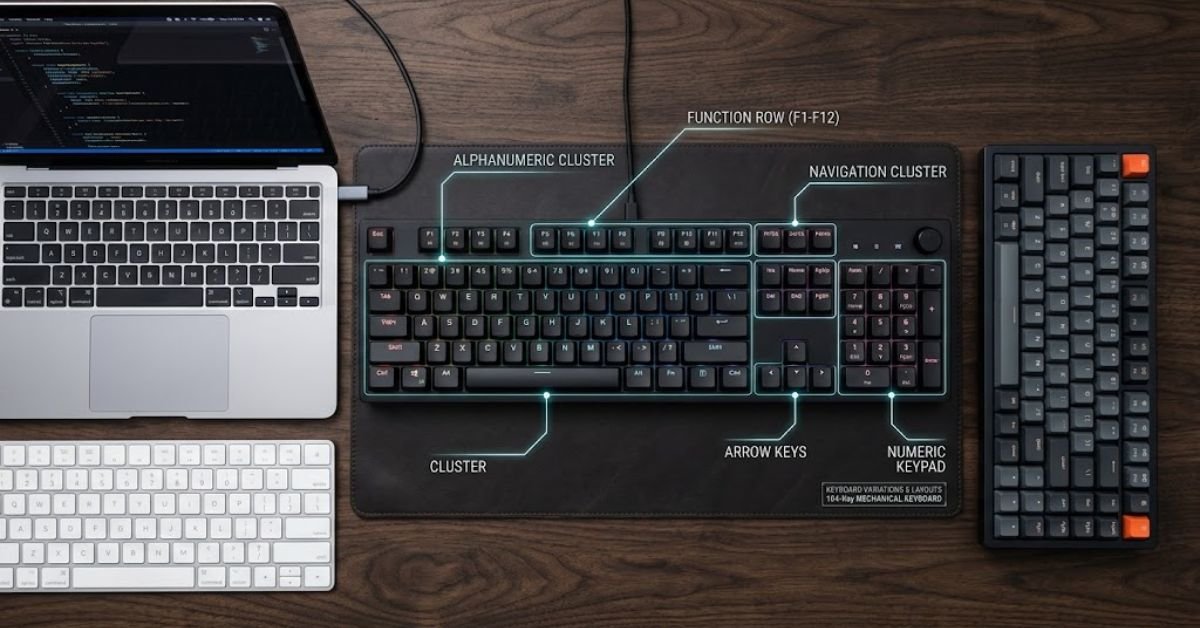
A standard full size keyboard has 104 keys on a Windows PC, or 103 keys on the older, more traditional layout. Mac users get 103 keys on a full size Apple keyboard with a numeric pad.
That’s the short answer. But if you’ve ever counted the keys on your own keyboard and landed on a different number, you’re not losing your mind. Keyboard sizing is messier than it looks, and the “right” number depends on your operating system, your country, and even the year your keyboard was manufactured.
Let’s break down exactly what you’re looking at, key by key.
The Quick Answer Table
Here’s the number you came for, sorted by keyboard type.
| Keyboard Type | Key Count | Common Use Case |
|---|---|---|
| Full Size (Windows, ANSI) | 104 keys | Standard US office/home PCs |
| Full Size (Windows, older/104-key predecessor) | 101/102 keys | Pre-Windows 95 era |
| Full Size Mac (with Numpad) | 103 keys | iMac, Mac Studio setups |
| Full Size ISO (European layout) | 105 keys | UK, Germany, most of Europe |
| Tenkeyless (TKL) | 87 keys | Gaming, space-saving desks |
| 75% Layout | 84 keys | Compact gaming/productivity hybrid |
| 60% Layout | 61 keys | Minimalist, portable builds |
Why 104 Keys Became the Standard
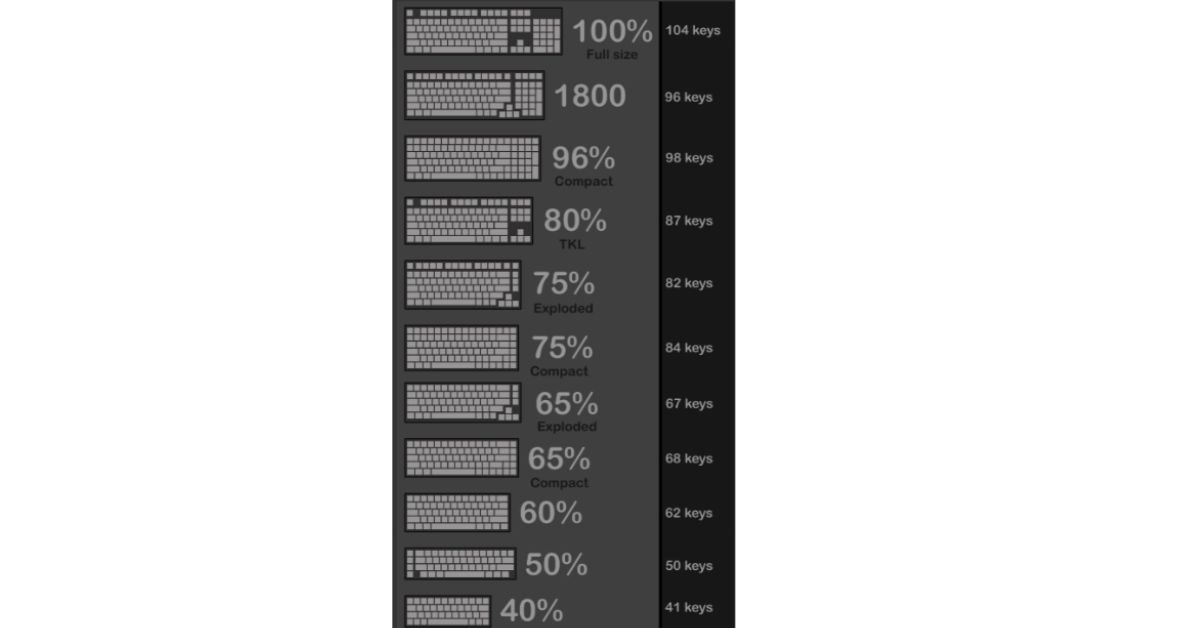
The 104-key layout isn’t arbitrary. It’s the result of Microsoft adding three keys to the older 101-key IBM layout back in 1995 when Windows 95 launched.
Those three additions were:
- Left Windows key — opens the Start menu
- Right Windows key — same function, right-hand access
- Menu key (also called the Application key) — mimics a right-click
Before that, IBM’s 101-key “Enhanced Keyboard” from 1986 was the gold standard, and it’s still technically the base full size layout in countries or setups that don’t use Windows-specific keys. That’s why you’ll sometimes see full size keyboards listed as “101/104-key” in product descriptions — manufacturers are covering both naming conventions.
Also Read: How to Clean Keycaps Safely Without Ruining Plastics
Breaking Down the 104 Keys by Section
A full size keyboard isn’t just 104 random buttons. It’s organized into five distinct zones, and understanding them helps explain why the layout works the way it does.
1. Alphanumeric Cluster (61 keys)
This is the core typing area: letters, numbers, punctuation, Tab, Caps Lock, Shift, Ctrl, Alt, and the spacebar. It’s identical across nearly every keyboard size, which is why even a compact 60% board feels familiar to type on.
2. Function Row (13 keys)
F1 through F12, plus Escape. These handle shortcuts like refreshing a browser (F5), renaming a file (F2), or toggling airplane mode on laptops.
3. Navigation Cluster (6 keys)
Insert, Delete, Home, End, Page Up, and Page Down. This cluster is the first thing manufacturers cut when they shrink a keyboard down to TKL or 75% sizes.
4. Arrow Keys (4 keys)
Up, down, left, right. Non-negotiable for most users, even on ultra-compact builds.
5. Numeric Keypad (17 keys)
Numbers 0-9, plus Num Lock, division, multiplication, subtraction, addition, decimal point, and Enter. This is the single biggest reason full size keyboards are physically wider than every other category.
Quick math check: 61 + 13 + 6 + 4 + 17 = 101 keys. Add the two Windows keys and the Menu key, and you get 104.
Full Size vs. TKL vs. 75%: Which One Do You Actually Need?
This is where most buying guides stop short. Knowing the key count matters less than knowing whether that layout fits your actual workflow.
| Factor | Full Size (104) | TKL (87) | 75% (84) |
|---|---|---|---|
| Numpad included | Yes | No | No |
| Desk space needed | Most | Moderate | Least |
| Best for spreadsheet/data entry | Excellent | Poor | Poor |
| Best for gaming (mouse room) | Poor | Excellent | Excellent |
| Arrow key access | Standard | Standard | Standard |
| Price (avg. mechanical) | $$ | $$ | $$$ |
Choose full size if:
- You work in Excel, accounting software, or any numbers-heavy job
- You rarely move your mouse far to the right
- You want dedicated keys for everything (less reliance on Fn combos)
Choose TKL or smaller if:
- You’re a gamer who needs mouse swing room
- Your desk is under 30 inches deep
- You mostly type text and rarely enter long number strings
Real-World Troubleshooting: “Why Doesn’t My Keyboard Match This Count?”
If you counted your keys and got a different number, here’s the most likely explanation.
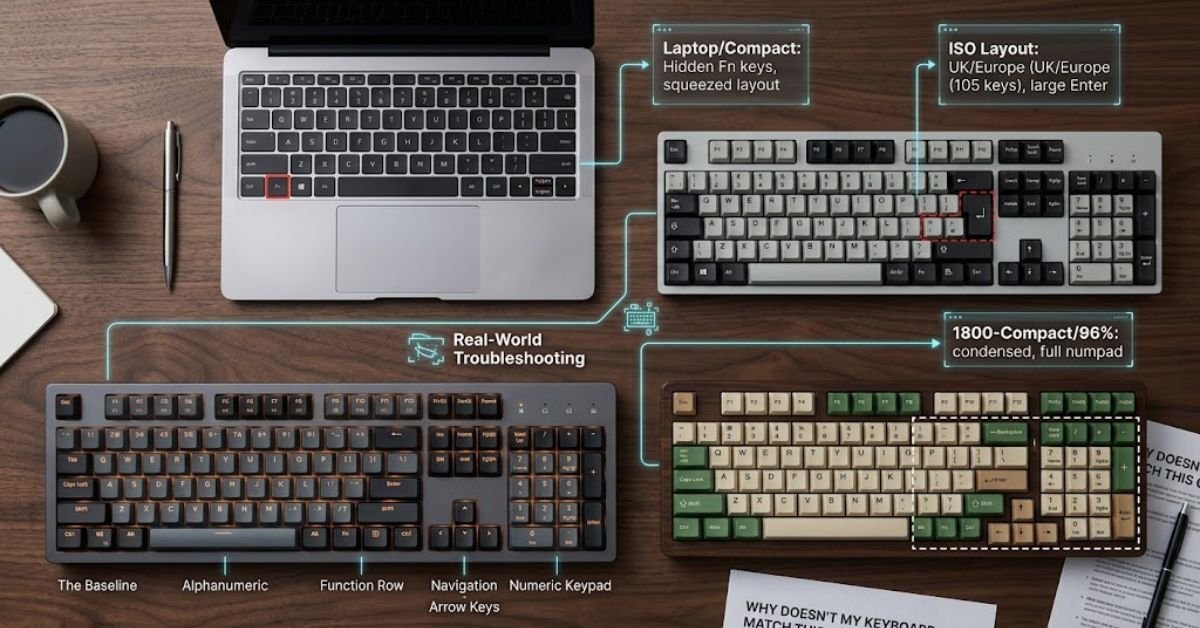
You have a laptop keyboard. Laptops almost never include a true numpad unless they’re 17-inch models. Many compress the arrow cluster or bury Home/End/PgUp/PgDn behind an Fn key. This isn’t a defect — it’s a space-saving trade-off manufacturers make deliberately.
You’re outside the US. ISO layouts (common in the UK and mainland Europe) add an extra key next to the left Shift and split the Enter key differently, bringing the total to 105 instead of 104.
You own a Mac. Apple’s full size Magic Keyboard with Numpad comes in at 103 keys because it drops the Menu/Application key entirely, relying on right-click and keyboard shortcuts instead.
You have a “1800-compact” or 96% layout. These squeeze the numpad closer to the main cluster to save width, but keep the same 100+ key count. It looks smaller but isn’t, key-count-wise.
A Quick Checklist Before You Buy a New Keyboard
Don’t just search “full size keyboard” and grab the first result. Run through this first:
- Measure your desk depth — full size keyboards typically run 17-18 inches wide
- Confirm your OS (Windows keys vs. Mac’s Command/Option layout aren’t interchangeable for shortcuts)
- Decide if you actually use the numpad weekly — if not, a TKL saves both space and money
- Check ANSI vs. ISO if you’re buying from a non-US retailer
- Look for at least a 1-year warranty if going mechanical — switches do wear down with heavy use
The Trade-Offs Nobody Mentions in Spec Sheets
Full size keyboards win on functionality but lose on ergonomics for a lot of users. Because the numpad shifts your entire typing position to the left, your right hand ends up reaching further for your mouse. Over an 8-hour workday, that extra few inches of lateral reach adds up and can contribute to shoulder strain.
This is genuinely why TKL and 75% boards exploded in popularity over the last decade, even outside gaming circles. Office workers who don’t need a numpad are trading key count for a more centered, neutral wrist position.
If you do need the numpad, a separate wireless numpad paired with a TKL keyboard is a middle-ground fix worth considering. You get full functionality on demand and can push it aside when you need the desk space.
Frequently Asked Questions
How many keys are on a full-size keyboard?
A standard US full-size keyboard has 104 keys, while international versions usually have 105 keys due to a slightly different Enter key layout.
Is it true that there are 26 keys on a keyboard?
No, but a keyboard contains 26 letter keys (A through Z). The total count for the entire board includes function keys, navigation buttons, and a number pad.
Is 104 keys a full keyboard?
Yes. A 104-key layout (known as the ANSI US standard) is the benchmark for a 100% full-size keyboard.
Is it called 9 key or 10 key?
It is called a 10-key (or 10-key numeric keypad). The name refers to the digits 0 through 9 used for quick data entry.
Which keyboard has 110 keys?
Certain JIS (Japanese Industrial Standard) extended full-size keyboards and media-focused mechanical boards feature 110 keys. These extra buttons accommodate special language conversion switches or dedicated volume and audio controls above the keypad.
Read More: MageGee Keyboard Software (2026): Setup, Fixes & Driver/How to Clean Keycaps Safely Without Ruining Plastics
