
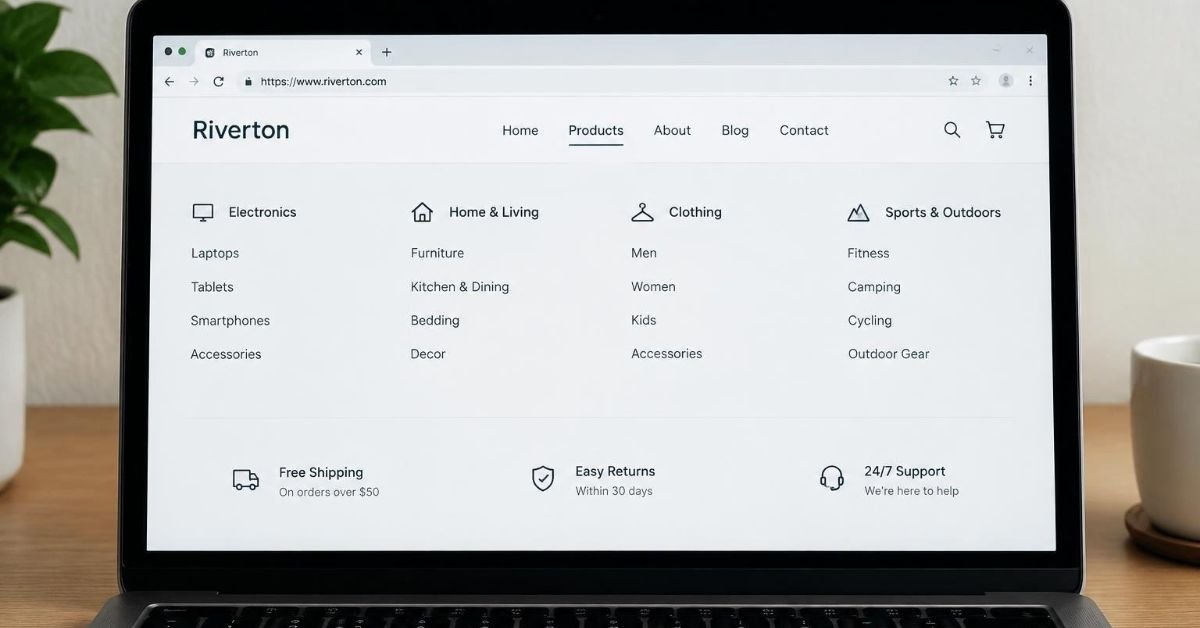
Website architecture plays a foundational role in determining how visitors interact with your online presence and how search engines evaluate your content. Beyond visual appeal, a well organized framework influences user experience, search visibility, and mobile performance.
What Is Website Architecture?
Website architecture refers to the structural blueprint of your online platform. It organizes individual pages, categories, navigation menus, and internal links into a logical hierarchy, ensuring visitors and search engines can navigate the content effortlessly.
Site architecture involves understanding how information is categorized and presented. This foundational framework dictates how users and search engines traverse your digital ecosystem, directly impacting overall site performance and accessibility across all modern devices.
Organization of Pages and Navigation Menus
Proper organization of pages and navigation menus prevents user frustration. A clear menu system, supported by a thoughtful URL structure and breadcrumb trails, helps users find the information they need without unnecessary clicks or confusion.
Importance of Logical Hierarchy
Establishing a hierarchical structure is crucial for maintaining clarity. A well-structured website guides users naturally from the homepage through relevant subcategories, ensuring that important content remains accessible and easy to navigate.
How Website Architecture Influences User Experience
Intuitive navigation directly enhances user experience and boosts engagement. When visitors can effortlessly locate products, services, and contact details, satisfaction increases, leading to lower bounce rates and higher conversion potential for businesses.
Intuitive Navigation and User Satisfaction
Intuitive navigation removes roadblocks during a visitor’s journey. Clear pathways and predictable layouts help users explore your site comfortably, fostering trust and encouraging them to spend more time engaging with your valuable business offerings.
Role of Descriptive Page Labels
Descriptive page labels and precise menu items act as reliable signposts. They instantly communicate what each section contains, helping visitors make informed decisions and guiding them smoothly toward their desired destination.
Benefits of Quick Access to Information
Providing quick access to essential information keeps visitors happy. Whether they are searching for pricing details or support resources, a streamlined layout ensures they find answers rapidly without friction or annoyance.
Why Website Architecture Matters for SEO
Search engines rely on clear site architecture to discover, crawl, and index pages efficiently. A logical framework, combined with smart internal linking, helps search engines understand content relationships and reward your pages with better visibility.
Search Engines and Page Discovery
Search engines use automated bots to explore your site. A clean structural design makes it easier for these bots to crawl your website, ensuring that all important pages are discovered and indexed without unnecessary delays.
Internal Linking and Content Relationships
Strategic internal links connect related content across your domain. These pathways distribute link equity effectively and help search engines understand the thematic relationships between different pages, supporting your broader SEO strategy.
Descriptive URLs and Page Titles
Descriptive URLs and optimized page titles clarify context for both human visitors and search algorithms. Avoiding duplicate pages and maintaining clean URL structures prevents ranking dilution and strengthens your organic search presence.
How Mobile Rendering Speed Affects Website Performance
Mobile rendering speed is vital for modern website performance. Ensuring your pages load and display correctly on smartphones and tablets prevents visitor drop-off and satisfies crucial mobile usability standards demanded by users.
Importance of Mobile Display and Loading
Optimizing mobile display guarantees that smartphone users enjoy a seamless experience. Fast rendering speeds prevent frustration, keeping engagement high and ensuring your content remains accessible regardless of the device being used.
Common Causes of Slow Mobile Performance
Slow mobile performance often stems from several common bottlenecks that hinder fast rendering times:
- Oversized images and excessive scripts
- Bloated plugins and inefficient code
Identifying these issues is essential for maintaining optimal site performance.
Recommendations for Optimizing Mobile Performance
Implementing several key optimization techniques dramatically improves mobile rendering speed. These best practices include:
- Responsive layouts
- Image optimization
- Browser caching
- Streamlined code
Together, these methods ensure swift delivery and enhance overall user satisfaction across every platform.
SEE MORE: Smarter Ways to Organize Websites and Online Tools for PC Users
The Connection Between Website Architecture and Mobile Usability
Challenges of Complicated Page Hierarchies
A complicated page hierarchy disrupts the overall structure of a website, making it frustrating for visitors to find the information they need quickly on mobile devices.
Mobile-Friendly Design Elements
Implementing a well-structured mobile layout enhances user experience and ensures visitors can navigate pages easily by incorporating the following essential elements:
- Readable text
- Appropriately sized buttons
- Clear calls to action
Streamlined Structure for Efficient Browsing
A streamlined site structure makes mobile browsing far more efficient, helping users access essential content rapidly while supporting overall site performance and encouraging higher engagement on smaller screens.
Common Website Architecture Mistakes to Avoid
Complicated Navigation Menus
Complicated navigation menus often confuse visitors, preventing them from locating essential products or services efficiently and negatively impacting the overall user experience across desktop and mobile devices alike.
Burying Important Pages
Burying important pages deep within your site structure makes it difficult for both visitors and search engines to discover valuable content, ultimately reducing organic visibility and potential conversions.
Identifying and Fixing Usability Issues
Regularly auditing your website helps identify broken links, poorly organized categories, and slow elements, allowing you to fix usability issues and maintain a high-performing digital platform for all visitors.
Practical Ways to Improve Website Architecture
Organizing Pages into Clear Categories
Organizing pages into clear categories and a logical hierarchy ensures that visitors can easily find relevant content, improving information architecture and supporting long-term search engine optimization goals.
Creating Descriptive Navigation Menus
Creating intuitive navigation menus with descriptive labels helps guide users smoothly across different subcategories, ensuring a seamless journey that enhances engagement and reduces frustration.
Using Website Analytics for Continuous Improvement
Leveraging website analytics and performance tools allows businesses to monitor user behavior, identify friction points, and continuously refine their site layout as their content and audience grow.
When Should a Business Consider Professional Website Design Help?
Indicators for Seeking Professional Assistance
When businesses experience outdated layouts, confusing navigation, poor mobile usability, or slow performance, recognizing these indicators is essential for maintaining a competitive online presence and supporting growth.
Benefits of Professional Website Design Services
Investing in professional expertise ensures your platform is built on a solid foundation, combining optimal site structure, enhanced mobile rendering speed, and improved search visibility for better results.
Exploring Beaverton Web Design Options
For companies seeking expert solutions to upgrade their digital presence, exploring Beaverton web design services can greatly improve website architecture, mobile usability, and overall performance.
