
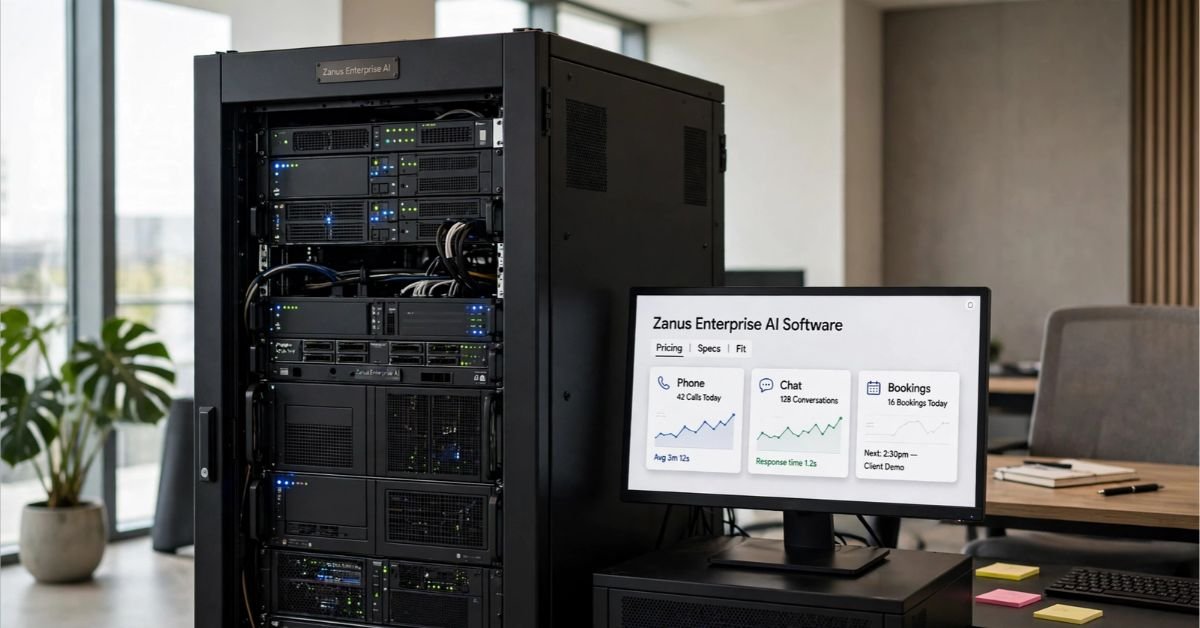
Zanus AI is a Pompano Beach, Florida company that sells private AI systems to businesses. You can get it as a hosted subscription for customer-facing work, or as a physical server that runs entirely inside your own building. Most people searching “Zanus enterprise AI software” want to know which of those they’re looking at, what it costs, and whether it’s worth the trouble. This guide covers each.
One note before we start. A different product also called Zanus exists: a no-code data analytics platform launched by Naviz Analytics in India. It has nothing to do with the Florida company, so check which one a given review or listing is talking about.
What Zanus AI Actually Is
Zanus describes itself as a privately held American company focused on AI and engineering, with hardware and software designed and assembled in the US. Its main selling point is ownership. Most enterprise AI runs as a cloud service, which means your prompts and files pass through someone else’s infrastructure. Zanus offers a way to run AI on equipment you control.
A listing in Commercial Integrator calls it a ready-to-use “sovereign AI” system that ships preconfigured, with hardware and software integrated and no cloud dependency. The same listing says it keeps working in secure or disconnected environments.
How the Product Is Organized
SSD Nodes reviewed the company’s site in October 2026 and found three layers.
| Layer | What it covers | Delivery |
| Front Office AI | Phone, web chat, email, quotes, bookings | Hosted subscription |
| Back Office AI | A business “AI operating system” with 15+ modules: AI chat, customer data, orders, documents, scheduling, automations, and an AI API | Hosted or on-premises |
| Private On-Premises AI (now branded Airtight AI) | The same system on Zanus hardware running Zanus OS | Physical server with a perpetual license |
The company says you don’t need your own developers. Its answer to that question is that you need the person who understands the process. That may hold for day-to-day use, but someone still has to load your knowledge, set up workflows, and train staff.
Hosted Plans and Pricing
SSD Nodes pulled pricing from Zanus’s site on October 20, 2026. Prices move, so confirm them on the vendor’s pricing page before you plan a budget.
- Bundled plans: Five tiers, from AI ANSWER at $329 a month to AI PRIVATE at $2,495 a month.
- Annual billing: $3,290 to $24,950 a year, about 16.7% less than paying monthly. AI PRIVATE is sold annually only, so the real cost is $24,950.
- Individual components: From $49 a month. Bundles come out roughly 25% to 30% cheaper than buying the same pieces separately.
- AI Phone: $99 a month on its own, with an operator included as of October 17, 2026.
AI Phone answers calls around the clock. The vendor lists 40 languages, but only English is included. Every other language is a separate one-time purchase, which matters if you take calls in more than one.
Also note that even AI PRIVATE, despite the name, is a hosted and isolated environment. None of the Front Office plans run on your hardware. If you want AI inside your building, you’re looking at the server.
The On-Premises Server
The server is the product that makes Zanus stand out. A manufacturing-focused write-up describes it as a private AI operating system that runs on your local network. Core functions don’t need the internet, and production data stays on site.
What the company says publicly:
- It runs Zanus OS and is sold with a perpetual license.
- It can run air-gapped and accepts offline update packages.
- It runs leading open-weight model families, chosen and sized with you at setup.
- Storage is RAID 10 NVMe.
- Maximum draw is 6 kW at full load.
- It ships preconfigured, with delivery around three weeks.
- A second option, the On-Prem Tokens Server, uses the same hardware but exposes only an OpenAI-compatible API, without the business modules.
What it doesn’t say: the GPU, the amount of RAM, the storage capacity, or which model families you’ll get. Pricing is by quote, based on GPU memory, RAM and context, and the number of tokens you use per day.
Check Your Power Before You Sign
Zanus says the server runs from four standard outlets on ordinary AC circuits, accepts 90 to 240 V at 50 or 60 Hz, and needs no rewiring, special electrician, or permits.
The math deserves a closer look, though. At 115 V, 6 kW works out to roughly 52 amps in total, or about 13 amps per outlet. A standard US wall outlet sits on a 15 or 20 amp circuit. If all four outlets share one circuit, it will trip under full load.
Before buying, work through this list:
- Confirm the four outlets are on separate circuits, and ask which electrical setup applies to your quote.
- Plan for cooling. Peak load gives off about 20,000 BTU per hour.
- Ask for the idle power draw, which isn’t published.
- Estimate your electricity bill. At $0.15 per kWh, eight full-load hours a day costs about $216 a month, and running flat out around the clock costs about $648. The vendor’s own figure of roughly $1 an hour at full load implies a somewhat higher rate than that, so use your local tariff.
Who Should Consider It
Zanus makes sense if a contract or regulator requires your data to stay on your premises, as with clinics, law firms, and plants. It also suits businesses with nobody who wants to maintain Linux servers and GPU drivers, and teams whose daily work lines up with the listed modules. For smaller teams, the hosted plans are a cheaper way to start.
It’s a weaker choice if your usage is light or uneven, since an API will usually cost less. The same goes if your data isn’t sensitive, if you want to try every new model the day it’s released, or if the lowest possible entry price is the priority.
Strengths and Weaknesses
| Strengths | Weaknesses |
| Data can stay in your building, with air-gap support | Hardware pricing is quote-only |
| Arrives preconfigured, so you don’t assemble a stack | GPU, RAM, and model details aren’t public |
| Perpetual license instead of rented seats | The 6 kW draw needs real electrical planning |
| Hosted plans offer a quicker, cheaper start | Sized to current token volume, so growth means a new quote |
| US design and assembly, according to the company | Almost no independent reviews |
That last point is worth taking seriously. G2 lists Zanus AI under AI agents for business operations, but when I checked, the profile had no reviews, and G2 said that was too few to offer buying insight. Until you’ve seen a demo or spoken with a current customer, treat the vendor’s claims as unverified.
Buy It, Build It, or Use an API?

SSD Nodes compared the appliance with renting a GPU server and assembling an open-source stack yourself. Their reasoning applies whichever way you lean.
The appliance is the better pick when four things are true: a contract or regulator requires data to stay in-house, nobody wants to run Linux, you have suitable power where the unit will sit, and the modules fit how you actually work. The quote is, in effect, what you pay to avoid hiring an infrastructure person.
Renting and building suits you if someone can take ownership of the server, a vetted hosting provider is acceptable, you want to choose your own models, and your usage is steady enough to justify a fixed monthly GPU bill. You’d also be responsible for integrations, since a rented stack comes without customer tables, scheduling, or booking flows.
An API is the practical choice if demand is low or spiky, the data isn’t sensitive, and you need something working this week.
One distinction is easy to miss. A rented server is still someone else’s machine. Your prompts and documents sit in the host’s memory and on its disks, so “private” there means private from the model vendor and the public internet, not from the hosting company. If a contract says data must stay in your building, only hardware in your building satisfies it.
Questions to Ask Zanus Before Buying
Get these answers in writing:
- Which GPU, how much RAM, and how much storage come in your quoted configuration?
- Which model families are supported, and how are models swapped? Can you load one that isn’t on the vendor’s list?
- What are the idle and peak power draws, and what circuit layout is required?
- What happens when your token volume outgrows the original sizing?
- What do support and updates cost after the first year?
- Which of the 15+ modules are included in your configuration?
If you get a demo, test it properly. Load a real set of your documents and ask questions you already know the answers to. Run your busiest hour, not just one user. Unplug the network and confirm the core functions still work. If you take calls in a second language, try one.
Common Rollout Problems
Breakers trip at peak load. Put the four plugs on separate circuits, or have an electrician check capacity.
The room gets too warm. At peak the unit gives off about 20,000 BTU an hour. Add cooling or move it somewhere ventilated.
Answers are vague or wrong. The knowledge base is usually the cause. Load cleaner, more current documents, then test against questions you can verify.
Performance slips as more people use it. The unit may have been sized for an earlier token volume. Ask about re-sizing before adding users.
Callers get the wrong language. Non-English languages are separate purchases, so make sure the language pack is active.
Is Zanus AI Worth It?
Zanus is aimed at organizations that want AI on their own premises without building an infrastructure team. The hosted plans give smaller businesses a lower-cost way in. The weak spots are real, though: hardware specs and pricing aren’t public, and independent reviews are scarce. Get the details in writing, test it with your own data, and talk to a reference customer before committing.
ALSO READ: VBox Software Guide: Setup, Fixes & Alternatives
Common Questions About Zanus AI
How can we ask questions to AI?
Type or speak your question in plain language to a chatbot like Claude, ChatGPT, or Gemini. Give context, say what you want back, and add details like your audience or format. Specific questions get sharper answers than vague ones.
How does Enterprise AI work?
It connects an AI model to a company’s own data, tools, and rules. Staff ask questions or trigger tasks, the model pulls from approved sources like documents, CRM, or ERP, and it returns an answer or takes an action. Access controls, logging, and human review keep it safe and auditable.
Which is the best AI platform to ask questions?
There’s no single winner. Claude, ChatGPT, and Gemini are all strong general-purpose options. Perplexity is handy when you want sourced web answers. Pick based on your task: writing and analysis, live research, or working inside Google or Microsoft apps. Try two or three on the same question and keep the one you trust most.
Which type of AI is designed to understand and work with human language?
Natural language processing (NLP). Today it’s mostly powered by large language models (LLMs), which read, summarize, translate, and write text.
Which language is mainly used for AI?
Python. Its libraries, such as PyTorch, TensorFlow, and scikit-learn, make it the default for building and training models. C++ and CUDA handle the heavy performance work underneath.
How many types of AI are there?
It depends on how you slice it. By capability, there are three: narrow AI (what exists today), general AI, and superintelligent AI (both still theoretical). By function, there are four: reactive machines, limited memory, theory of mind, and self-aware AI. Only the first two exist in practice.
