
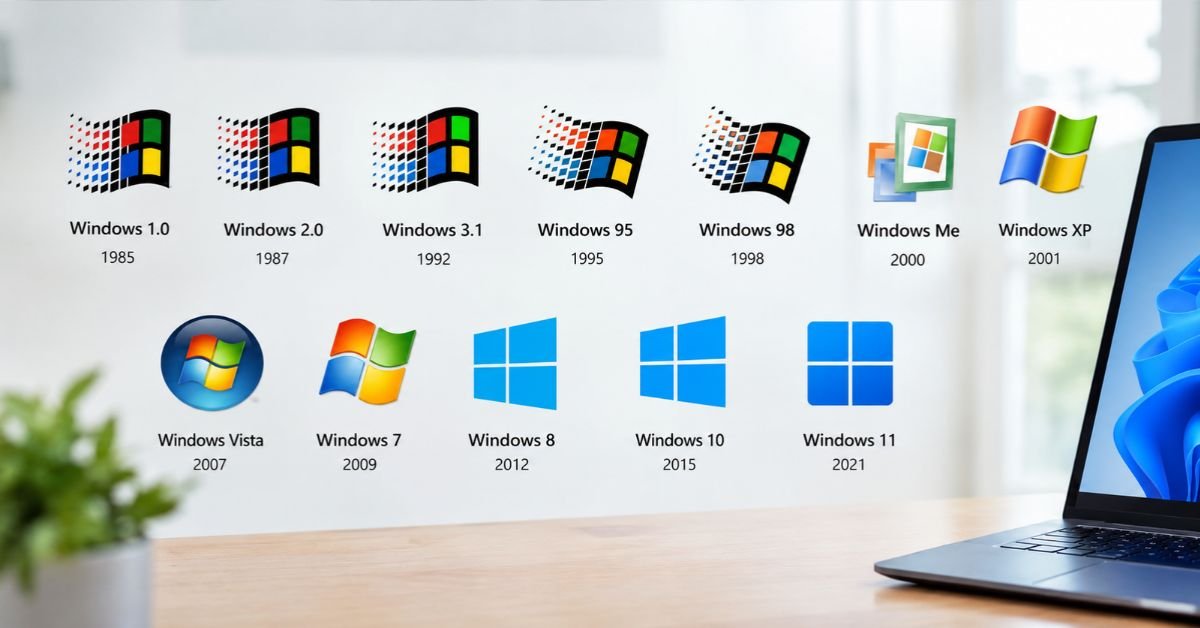
Every version of Windows has worn a different face. Some looked like a rectangle on a gray desktop. Others looked like a glossy orb you wanted to click just because it was pretty.
This guide walks through every major Windows logo from 1985 to today, explains why each one changed, and covers practical stuff too: where to find official logo files, how to use them legally, and what to do when your PC freezes on the Windows logo at startup.
Quick Answer: How Many Times Has the Windows Logo Changed?
Microsoft has used roughly eight distinct logo styles across more than a dozen major releases. The big shifts happened at Windows 1.0 (1985), Windows 3.x (1990-1992), Windows 95 (1995), Windows XP (2001), Windows Vista (2007), Windows 8 (2012), and Windows 11 (2021).
The core idea shifted from a wavy flag to a literal window. That one change defines the last decade of Windows branding.
Windows Logo Timeline at a Glance
| Version | Release Year | Logo Style | Key Design Trait |
| Windows 1.0 | 1985 | Basic wordmark and simple window motif | Plain, boxy, text-first |
| Windows 3.0 / 3.1 | 1990 / 1992 | First colorful flag | Four colored panes, early waving effect |
| Windows 95 | 1995 | 3D waving flag | Red, green, blue, yellow panes |
| Windows 98 | 1998 | Flag with sky imagery | Softer, cloud-style startup look |
| Windows 2000 / ME | 2000 | Refined flag | Cleaner edges, subdued tone |
| Windows XP | 2001 | Vibrant flag | Bright colors, lowercase “xp” |
| Windows Vista | 2007 | Glass orb | Flag inside a glossy circle |
| Windows 7 | 2009 | Polished orb | Glowing blue, rounded panes |
| Windows 8 / 8.1 | 2012 | Flat window in perspective | Metro-style, no flag |
| Windows 10 | 2015 | Flat four-pane window | Straight-on, blue, minimal |
| Windows 11 | 2021 | Refined four-pane window | Cleaner spacing, modern gradients |
The Early Years: Windows 1.0 Through 3.1 (1985-1992)
Windows 1.0 (1985): No Real Logo Yet
Windows 1.0 launched in November 1985 as a graphical shell running on top of MS-DOS. Branding was an afterthought. The identity leaned on text and a simple window shape, which fit the product: tiled windows on a screen, nothing fancy.
Nobody thought of Windows as a consumer brand yet. It was software for people who already owned a PC.
Windows 3.0 and 3.1: The Flag Appears
Windows 3.0 (1990) and Windows 3.1 (1992) changed everything. Microsoft introduced a four-colored flag of panes, and it started to look like a wave in motion.
This is the logo ancestor you recognize. It also arrived at the moment Windows became a mainstream product, with the 3.x line selling millions of copies. The flag gave the brand something people could remember and point to.
See More: Windows 11 BypassNRO: Does It Still Work? (2026 Fix)See More:
The Flag Era: Windows 95 to Windows Me (1995-2000)
Windows 95: The Logo That Defined a Generation
Windows 95 launched in August 1995 with a huge marketing push. The logo was a waving flag in four colors: red, green, blue, and yellow, set above the “Windows 95” wordmark.
It paired with the first Start button, and the combination became the defining image of 1990s computing. If you pictured “old Windows” right now, you probably saw this flag.
Windows 98, 2000, and Me: Refinement, Not Revolution
Windows 98 kept the flag and layered in sky and cloud imagery on the boot screen. Windows 2000 went more corporate, since it targeted businesses. Windows Me (Millennium Edition) played with soft, faded visuals that felt fresh at the time and a bit dated soon after.
Each version tweaked the flag’s polish. None changed the concept.
The Peak of Color: Windows XP (2001)
Windows XP arrived in October 2001 and brought the most vibrant, recognizable flag in the franchise. Colors were brighter, curves were smoother, and the wordmark used a lowercase “xp” that felt friendly.
The default Bliss wallpaper and the green Start button matched the logo’s cheerful tone. XP lasted so long on real desktops that its logo became the visual shorthand for “classic Windows” for a whole generation.
Why it worked:
- Bright colors signaled a consumer-friendly OS
- The flag looked alive, not stiff
- The branding matched the new interface theme
The Glass Era: Windows Vista and Windows 7 (2007-2009)
Windows Vista: Enter the Orb
Windows Vista put the flag inside a glossy circular orb. The same orb sat on the taskbar as the Start button, so the logo and the interface became one object.
That was a smart move. Instead of a logo you only saw at boot, the brand lived on your screen all day. Vista itself got mixed reviews, but the orb design aged well.
Windows 7: Polished and Confident
Windows 7 (2009) kept the orb with a cleaner, glowing blue finish. Many people still call it the best-looking Windows ever, and the logo is part of that memory.
If you’re a designer, notice how the shapes got rounder and the lighting got softer. Microsoft was perfecting the glass look right before it abandoned it.
The Flat Reset: Windows 8, 10, and 11 (2012-Today)
Windows 8: Goodbye Flag, Hello Window
In 2012, Microsoft threw out the waving flag. Windows 8 used a flat, blue window shown in perspective, matching the tile-based Start screen and the broader Metro design language.
The change also made a wordplay point: the product is called Windows, so the logo finally looked like a window. It was a controversial move, and it set the template for everything after.
Windows 10: Simple and Straight-On
Windows 10 (2015) removed the perspective. The logo became a flat four-pane window facing forward, in blue. It is the simplest Windows logo ever made.
That simplicity helps. It scales cleanly from a 16-pixel taskbar icon to a billboard.
Windows 11: Cleaner and More Modern
Windows 11 (October 2021) refined the same idea with tidier spacing and subtle color treatment. The centered Start button on the taskbar gave the logo a more prominent spot than it had in years.
It’s a refinement, not a reinvention. Microsoft clearly believes the four-pane window is the final shape.
Why Microsoft Keeps Changing the Windows Logo
Logo changes at Microsoft usually track three forces:
- Interface design trends. The 3D flag fits the bevels of the 1990s. The flat window fit flat UI in the 2010s.
- Hardware and screen quality. Glossy orbs needed better displays and graphics. Flat shapes work on any screen, including phones.
- Brand consistency. Microsoft’s own four-color corporate logo got a flat update in 2012, and Windows branding moved in the same direction.
Pros and Cons of Each Design Philosophy
| Era | Pros | Cons |
| Wavy flag (1992-2001) | Memorable, colorful, instantly “Windows” | Looks dated, hard to scale small |
| Glass orb (2007-2009) | Beautiful, tied to the Start button | Heavy, relies on gradients |
| Flat window (2012-today) | Clean, scales everywhere, matches the name | Less personality, less color |
How to Use the Windows Logo Legally
People often grab a logo from a search result and drop it into a blog post or slide deck. That can cause trouble. The Windows logo is a registered trademark of Microsoft.
Follow this checklist before publishing:
- [ ] Download official artwork from Microsoft’s brand and trademark resources, not a random image site
- [ ] Do not alter the colors, proportions, or shape
- [ ] Do not imply Microsoft endorses your product or site
- [ ] Use the logo to refer to Windows, not as your own brand mark
- [ ] Check Microsoft’s current trademark guidelines for your specific use case
For editorial content like a history article, using a logo to illustrate the topic is common practice. For product packaging, ads, or apps, read the guidelines closely first.
SEE MORE: What is Windows 365? Complete Cloud PC GuideSEE MORE:
Troubleshooting: Stuck on the Windows Logo at Startup
Searchers looking up Windows logos sometimes arrive because their own PC is frozen on the boot logo. Here is what actually helps, in order.
Step 1: Wait, Then Power Cycle
After a big update, Windows can sit on the logo with spinning dots for several minutes. Give it 15 to 20 minutes. If the drive light is not blinking at all, hold the power button for 10 seconds, then restart.
Step 2: Disconnect Peripherals
Unplug USB drives, printers, and docks. A faulty device can hang the boot process.
Step 3: Trigger Automatic Repair
Force-shut down the PC three times during boot. Windows should open the Recovery Environment. From there choose Troubleshoot > Advanced options > Startup Repair.
Step 4: Try Safe Mode
In Recovery, choose Startup Settings > Restart, then press 4 or F4 for Safe Mode. If Windows loads, uninstall the latest update or driver you installed.
Step 5: Repair System Files
From Command Prompt in Recovery or Safe Mode, run these:
sfc /scannow
DISM /Online /Cleanup-Image /RestoreHealth
Step 6: Check Your Drive
Run chkdsk C: /f and check your drive’s health. A failing SSD or hard drive is a common root cause. If repairs keep failing, back up your data before attempting a reset or reinstall.
Spotting a Windows Version by Its Logo
Need to identify an old PC or screenshot? Use this quick guide.
- Waving flag with “95” or “98”: Windows 95 or 98 era
- Bright, curvy flag with lowercase “xp”: Windows XP
- Glass circle containing a flag: Windows Vista or 7 (Vista is greener, 7 is bluer)
- Flat blue window in perspective: Windows 8 or 8.1
- Straight-on four-pane window: Windows 10 or 11 (check the taskbar layout and Start button position to tell them apart)
Frequently Asked Questions
What does the Windows logo represent?
The logo has always pointed at the product name. Early versions used a flag to suggest a window waving in the wind, while modern versions show an actual window split into four panes.
What was the first Windows logo?
Windows 1.0 in 1985 had a basic, text-led identity with a simple window motif. The recognizable colorful flag first appeared with Windows 3.0 and 3.1, and it became famous with Windows 95.
Why did Microsoft remove the flag from the Windows logo?
Microsoft shifted to flat design starting with Windows 8 in 2012. The flag’s curves and gradients clashed with the new flat, tile-based interface, so the company replaced it with a simple window that matched the product name.
Which Windows logo is the best?
It’s subjective. Many fans prefer the Windows XP flag or the Windows 7 orb for nostalgia and personality. Designers often prefer the flat window of Windows 10 and 11 because it’s clear, scalable, and consistent.
