

AMD launched the AM4 socket back in 2016, and plenty of gaming PCs still run on it. That’s not a surprise. A good Ryzen 5000 chip can turn an aging system into a very capable one without touching your motherboard or RAM.
The tricky part is choosing. The AM4 lineup is crowded, a few of the best chips are hard to find, and some of the others cost more than they should. Here’s how the options really stack up.
The short answer: the Ryzen 7 5800X3D is the fastest AM4 gaming CPU ever made. The Ryzen 7 5700X3D gives you nearly the same experience for less money, and the Ryzen 5 5600 is the smart buy if you’re watching your budget.
The Best AM4 CPUs for Gaming at a Glance
| CPU | Cores/Threads | Boost Clock | L3 Cache | TDP | Best For |
| Ryzen 7 5800X3D | 8/16 | 4.5 GHz | 96 MB | 105W | Fastest gaming on AM4 |
| Ryzen 7 5700X3D | 8/16 | 4.1 GHz | 96 MB | 105W | Best overall value |
| Ryzen 5 5600X3D | 6/12 | 4.4 GHz | 96 MB | 105W | Mid-budget X3D (limited availability) |
| Ryzen 7 5700X | 8/16 | 4.6 GHz | 32 MB | 65W | Gaming plus multitasking |
| Ryzen 5 5600 | 6/12 | 4.4 GHz | 32 MB | 65W | Best budget pick |
| Ryzen 5 5600X | 6/12 | 4.6 GHz | 32 MB | 65W | A slightly faster 5600 |
| Ryzen 5 5500 | 6/12 | 4.2 GHz | 16 MB | 65W | Tightest budgets |
| Ryzen 9 5900X / 5950X | 12/24 and 16/32 | 4.8-4.9 GHz | 64 MB | 105W | Gaming plus streaming and rendering |
Prices on these chips move around a lot, since AM4 production has wound down and stock differs from store to store. Check live listings before you commit.
Is AM4 Still Worth It in 2026?
If you already own an AM4 board, yes, and it’s not close. A CPU swap is one of the cheapest ways to get a real performance boost.
You keep your DDR4 memory and your motherboard. The platform is also mature, so BIOS support, drivers, and cooler compatibility are all well sorted. And the best AM4 chips still handle 1080p and 1440p gaming comfortably.
There’s a catch, though. AM4 is a dead end. You won’t get PCIe 5.0 or DDR5, and no new CPUs are coming. If you’re building from scratch and have some budget flexibility, AM5 deserves a look. If you’re upgrading what you have, AM4 is hard to beat on cost.
SEE MORE: Best iGPU for Gaming in 2026: Top Picks Ranked
The Best AM4 Gaming CPUs, Explained

Ryzen 7 5800X3D: The Fastest Option
This is the chip AM4 will be remembered for. AMD stacked an extra 64 MB of cache on top of the processor, which brings the total L3 cache to 96 MB. Games love cache, and the results show it. Simulation titles, MMOs, and competitive shooters benefit the most.
What’s good:
- The best gaming performance on AM4, often beating newer mid-range chips in cache-heavy games
- Runs cool and efficiently for what it delivers
- Fits most existing AM4 boards after a BIOS update
What’s not:
- The multiplier is locked, so traditional overclocking is off the table
- Hard to find new, and often priced at a premium
- Clock speeds are lower than the regular 5800X, so it trails in some non-gaming workloads
If you want the absolute best and can find one at a fair price, this is the one.
Ryzen 7 5700X3D: The Best Value
The 5700X3D uses the same 3D V-Cache design as its bigger sibling, just with slightly lower clocks. In actual games, the gap is usually a few percent. It also tends to cost less and is easier to track down.
That makes it the best AM4 gaming CPU for most people once price enters the picture. It’s an especially strong upgrade if you’re coming from a Ryzen 1000, 2000, or 3000 chip.
What’s good:
- Close to 5800X3D gaming performance
- Eight cores handle games and background apps without strain
What’s not:
- Still locked for overclocking
- Not worth the jump if you already own a 5800X3D or 5600X
Ryzen 5 5600X3D: Good, If You Can Find One
This chip brings the 96 MB cache to a six-core design, so you get most of the X3D benefit in games at a lower price. The problem is availability. It was sold in limited quantities through select retailers, so it may not be in stock when you look. If you spot one at a good price, it’s worth considering.
Ryzen 5 5600 and 5600X: The Budget Favorites
For strong gaming performance without spending much, the Ryzen 5 5600 is the safe choice. Six cores and twelve threads cover modern games well, and the chip runs cool even on a basic cooler.
The 5600X adds a small clock bump. If the price gap between the two is tiny, take the 5600X. If it’s larger, the 5600 is the better deal.
What’s good:
- Excellent price-to-performance
- Low 65W power draw
- Easy to cool
What’s not:
- Less cache than the X3D chips, so it falls behind in cache-heavy games
- Six cores can feel tight if you stream or keep a lot of apps open
Ryzen 7 5700X: The Balanced Pick
The 5700X is an eight-core, 65W processor with higher clocks than the X3D parts. It won’t match them in games, but it beats them in multi-threaded work like video editing. If you game most of the time but also edit video or run virtual machines, it’s a sensible middle ground.
Ryzen 5 5500: For the Tightest Budgets
The 5500 is cheap, but it comes with trade-offs. It has just 16 MB of L3 cache and supports PCIe 3.0 only, which can matter with a modern graphics card that uses a narrower PCIe connection.
It still plays most games well at 1080p. If you can stretch your budget to a 5600, though, do it.
Ryzen 9 5900X and 5950X: Overkill for Gaming Alone
These 12 and 16-core chips are more than games need. Most titles rarely use more than eight cores, so you’d be paying for performance you won’t see in frame rates.
They make sense if gaming is only part of what your PC does, such as streaming, rendering, compiling code, or running several heavy apps at once.
Which One Fits Your Goal?
| Your Goal | Best Pick |
| Highest FPS possible on AM4 | Ryzen 7 5800X3D |
| Best overall value | Ryzen 7 5700X3D |
| Cheap and fast | Ryzen 5 5600 |
| Gaming plus productivity | Ryzen 7 5700X |
| Gaming plus streaming | Ryzen 9 5900X |
| Lowest possible cost | Ryzen 5 5500 |
How Much Does the CPU Really Matter?
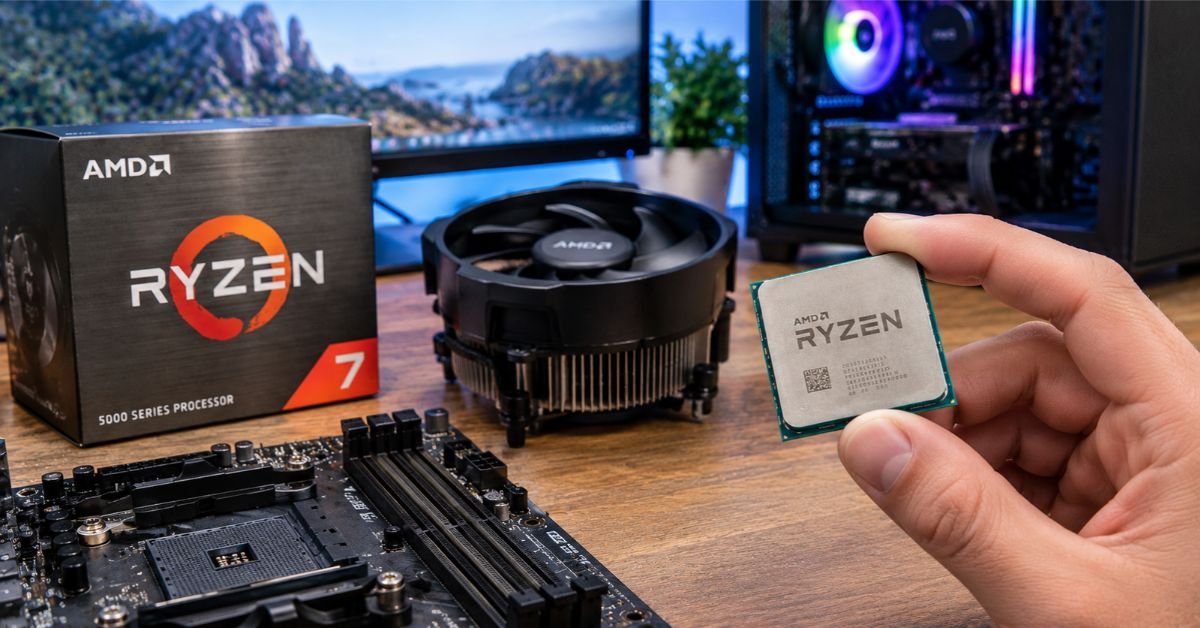
It depends on where your bottleneck is. A CPU bottleneck happens when your graphics card ends up waiting on the processor, and it’s most likely when you play at 1080p with a high-end GPU, chase high refresh rates (144 Hz and up), or play CPU-heavy games like strategy titles, simulators, and big multiplayer games.
At 1440p and 4K, the GPU does most of the heavy lifting. In those cases, a Ryzen 5 5600 often performs close to a 5800X3D. If your budget is limited, put your money into the graphics card first.
Check Compatibility Before You Buy
Most AM4 upgrade headaches come from skipping this step. Before you order anything:
- Find your exact motherboard model. It’s printed on the board, or you can look it up in Windows system information.
- Check the manufacturer’s CPU support list. It also tells you the minimum BIOS version you’ll need.
- Look at your chipset. B550 and X570 boards generally support Ryzen 5000 out of the box. B450 and X470 boards need a BIOS update. A320 boards often have limited or no support.
- Plan the BIOS update. You may need an older CPU installed to flash it. Some boards have a BIOS flashback button that works without any CPU at all.
- Think about cooling. Any AM4 cooler will physically fit, but 105W chips like the X3D models do better with a decent one.
One more thing worth knowing: on some older boards, updating to a BIOS that supports Ryzen 5000 can drop support for very old Ryzen chips. Read the release notes before you flash.
How to Swap Your AM4 CPU Safely
The process is simple, but a few steps are worth doing in order.
- Back up your data. A CPU swap rarely causes problems, but a failed BIOS update can.
- Update the BIOS first, using the newest stable version that supports your new chip.
- Shut down, unplug, and hold the power button for a few seconds to drain leftover power.
- Remove the cooler. If it’s stuck, twist it gently. Warming the CPU slightly can help loosen the thermal paste.
- Lift the socket lever and swap the chip. Line up the triangle on the CPU with the one on the socket, and never force it.
- Apply fresh thermal paste. A pea-sized dot is enough.
- Reinstall the cooler and reconnect the fan cable.
- Boot into the BIOS, confirm the CPU is detected, and enable XMP or DOCP for your RAM.
Troubleshooting Common Problems
The PC won’t boot after the swap. Nine times out of ten, the BIOS doesn’t support the new chip yet. Update it using an older CPU or the flashback feature.
It boots, but the CPU is detected wrong. Check your BIOS version. Older releases can misidentify the chip or limit its features.
Temperatures are high. Reseat the cooler and check your thermal paste. X3D chips can run warm at the surface even when power draw is modest, so a good cooler pays off.
RAM won’t hit its rated speed. Turn on XMP or DOCP. For Ryzen, DDR4-3600 with CL16 or lower is the sweet spot.
Random crashes after upgrading. Reset the BIOS to defaults, do a clean power cycle, and test your RAM settings one at a time. Unstable memory profiles are a common culprit.
What Else Might Need an Upgrade?
A new CPU only helps if the rest of the system keeps up.
- RAM: 16 GB is the minimum for gaming, and DDR4-3200 to 3600 is ideal.
- GPU: Pair a strong CPU with a strong graphics card. A 5800X3D alongside an entry-level GPU is wasted money.
- Power supply: A quality 550W to 650W unit covers most AM4 gaming builds.
- Storage: An SSD makes loading and general responsiveness much better. NVMe is the better choice if your board supports it.
AM4 or AM5?
Stay on AM4 if you already own an AM4 board and DDR4 RAM, your budget is limited, or you mostly play at 1080p or 1440p.
Move to AM5 if you’re building a new PC, want DDR5 and PCIe 5.0, or plan to keep the system for many years. Put simply, AM4 wins on cost today, and AM5 wins on longevity.
The Bottom Line
The Ryzen 7 5800X3D is the fastest AM4 gaming CPU, and the Ryzen 7 5700X3D gets you almost the same experience for less. If you just want smooth gameplay without overspending, the Ryzen 5 5600 is the one to buy.
Match your pick to your GPU, your budget, and your motherboard. And check BIOS support before you order, because that one step prevents most of the problems people run into.
FAQs
Which Ryzen AM4 processor is the best?
The Ryzen 7 5800X3D is the best AM4 processor for gaming, thanks to its 96 MB of L3 cache. If you want almost the same experience for less money, the Ryzen 7 5700X3D is the smarter buy.
Is AM4 dead for gaming?
Not at all. The platform won’t get new CPUs, but the top Ryzen 5000 chips still run modern games smoothly at 1080p and 1440p. “Finished” is a better word than “dead.”
Is AM4 outdated in 2026?
On features, yes: it has no DDR5 and no PCIe 5.0. On gaming performance, not really. If you already own an AM4 board, an upgrade to a Ryzen 5000 chip still makes a lot of sense.
Is the 5800X3D the best AM4 CPU?
For gaming, yes. It’s the fastest chip AM4 ever got. The catches are that it’s hard to find new and often overpriced, so many buyers are better off with the 5700X3D.
Should I buy an AM4 or AM5?
Choose AM4 if you’re upgrading an existing PC or working with a tight budget. Choose AM5 if you’re building from scratch and want DDR5, PCIe 5.0, and a longer upgrade path.
What is the best AM4 build for gaming in 2026?
Pair a Ryzen 7 5700X3D (or a 5800X3D if you find one at a fair price) with a B550 motherboard, 16 GB of DDR4-3600 CL16 RAM, and a good mid-range or better GPU. Add an NVMe SSD and a quality 550W to 650W power supply, and you have a strong build for the money.
Ree Related Blogs
- What Is PC Specifications? A Simple Guide to Your Specs
- LGA 1151 Best CPU: Top Picks for Every Budget (2026)
- Normal Motherboard Temperature: Safe Ranges & Fixes
- Best iGPU for Gaming in 2026: Top Picks Ranked
