
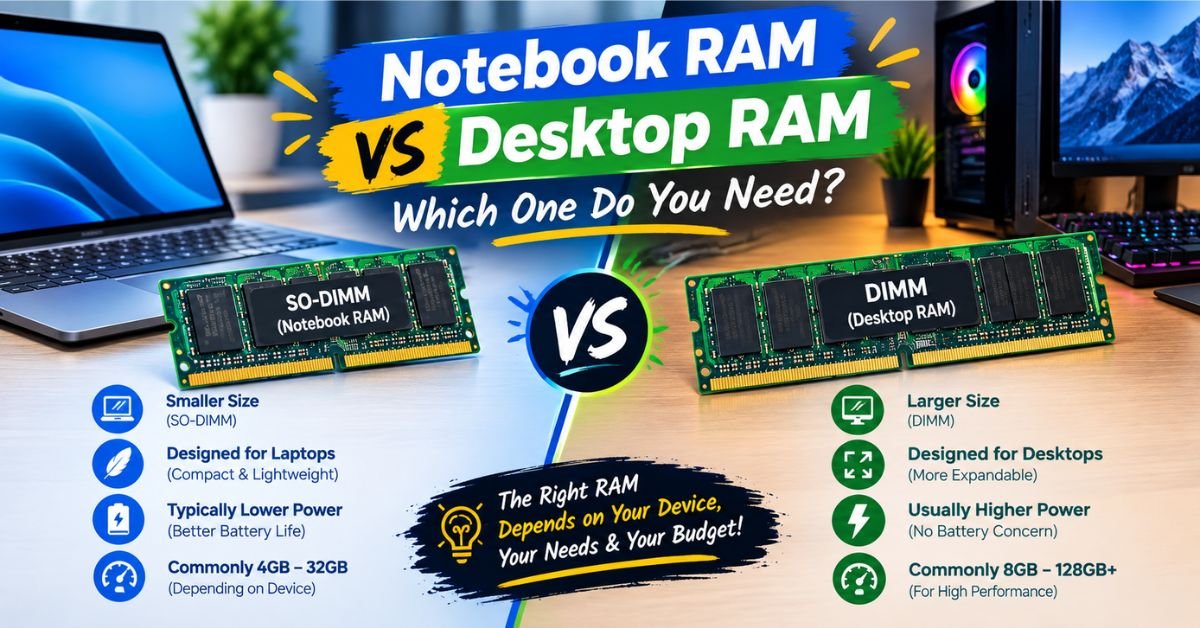
You’re staring at two RAM listings. One says “SODIMM.” The other says “DIMM.” Both claim to be DDR5-5600. Both promise to speed up your machine. But you can’t just grab either one and slot it into whatever you own.
Notebook RAM and desktop RAM are not interchangeable, and the differences go deeper than just physical size. If you’ve ever tried to force a laptop memory stick into a desktop motherboard (or vice versa), you already know this the hard way. Let’s break down exactly what separates them, when it matters, and how to make the right buying decision.
The Quick Answer
Notebook RAM (SODIMM) is physically smaller, built for tight spaces, and often runs at lower voltage to save battery. Desktop RAM (DIMM) is larger, easier to cool, and generally cheaper per gigabyte because manufacturers produce more of it.
Performance-wise, a modern desktop DIMM and a modern notebook SODIMM at the same speed and timings perform almost identically in raw bandwidth tests. The real differences show up in upgradeability, cost, thermal headroom, and how each system uses that memory.
Notebook RAM vs Desktop RAM: Side-by-Side Comparison
| Feature | Notebook RAM (SODIMM) | Desktop RAM (DIMM) |
| Physical size | ~2.6 inches (67.6mm) | ~4.7 inches (133.35mm) |
| Pin count (DDR5) | 262 pins | 288 pins |
| Typical capacity per stick | 8GB–48GB | 8GB–128GB |
| Price per GB | Usually 10-20% higher | Usually cheaper |
| Upgrade slots available | Often 1-2 | Usually 2-4 |
| Cooling | Passive, relies on chassis airflow | Can use tall heat spreaders, RGB coolers, active fans |
| Overclocking headroom | Limited | Significantly more |
| Common form factor found in | Laptops, mini PCs, some NUCs | Full towers, mid-towers, workstations |
| Is the soldered option common? | Yes (many ultrabooks) | Rarely |
Physical Differences: Size, Pins, and Why It Matters
The most obvious difference is size. A SODIMM (Small Outline Dual In-line Memory Module) is roughly half the length of a standard DIMM. That’s not an accident laptop manufacturers have to cram a motherboard, battery, cooling system, and storage into a chassis that’s often under an inch thick.
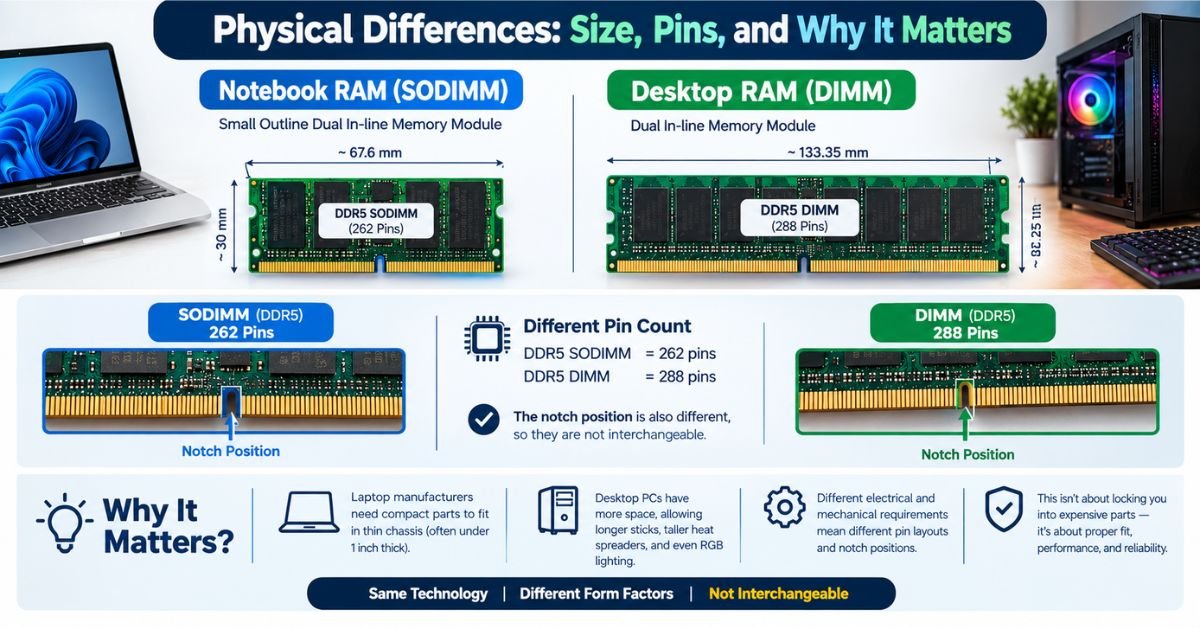
Desktop DIMMs don’t face that constraint. A mid-tower case has room to spare, so manufacturers can build longer sticks with taller heat spreaders and even RGB lighting strips without worrying about clearance.
Pin count also differs, and this is the part that actually stops you from swapping modules. DDR5 desktop DIMMs use 288 pins. DDR5 SODIMMs use 262 pins. The physical notch position is different too, so even if you tried to force it, a desktop stick will not fit into a laptop’s SODIMM slot, and a laptop stick will not fit into a desktop’s DIMM slot.
This isn’t manufacturers trying to lock you into buying more expensive parts. The pin layout accounts for genuinely different electrical and mechanical requirements between the two form factors.
A Quick Troubleshooting Note
If you’ve ever bought RAM online and it arrived not fitting your machine, here’s the most common cause:
- You checked “DDR5” but not the form factor. Always confirm SODIMM vs UDIMM (unbuffered DIMM) before ordering.
- You assumed laptop and desktop specs transfer 1:1. They share a memory standard (like DDR5) but not a physical connector.
- Your laptop uses soldered RAM. Many modern ultrabooks (recent MacBooks, most Dell XPS/Lenovo Yoga models, Microsoft Surface laptops) don’t have swappable RAM slots at all the memory is soldered directly to the motherboard.
Before buying anything, check your exact model number against the manufacturer’s memory specification page, not just the general product family.
Performance: Is Desktop RAM Actually Faster?
This is where a lot of misinformation floats around. At identical clock speeds and timings, desktop and notebook RAM deliver nearly identical raw throughput. A DDR5-5600 SODIMM and a DDR5-5600 UDIMM aren’t meaningfully different in bandwidth or latency on paper.
Where desktops pull ahead is in three practical areas:
1. Higher maximum speeds are more common on desktop. Enthusiast desktop RAM kits routinely hit DDR5-6000, 7200, or higher with aggressive timings, because desktop cooling and power delivery can support it. Laptop RAM speeds tend to cap lower and more conservatively, since the manufacturer has to guarantee stability across a much tighter thermal and power envelope.
2. Dual-channel and quad-channel configurations are easier to hit on desktop. Most laptops ship with two SODIMM slots (sometimes just one). Desktops, especially workstation and HEDT boards, can offer four or eight slots, letting you build out much larger, more heavily interleaved memory setups.
3. Overclocking and XMP/EXPO profiles work more reliably on desktop. Desktop motherboards are built with more voltage regulation headroom and BIOS-level tuning options. Laptop RAM, even when technically overclockable, rarely gets the same manufacturer support or documented safe margins.
SEE MORE: How to Check RAM Speed — And Fix It If It’s Slow
Real-World Impact
If you’re doing typical productivity work browsing, spreadsheets, video calls, light photo editing you won’t notice a meaningful difference between well-specced notebook RAM and desktop RAM. The bottleneck in most real-world tasks is the CPU, storage speed, or your internet connection, not memory bandwidth.
Where it does show up:
- Video editing and 3D rendering: Desktop’s ability to run 64GB+ at higher speeds across four slots noticeably reduces render times and timeline scrubbing lag.
- Virtual machines and heavy multitasking: More slots means more total capacity headroom, which matters more than raw speed once you’re running several VMs.
- Competitive gaming: Faster RAM (specifically lower latency) genuinely improves 1% lows in CPU-bound titles, and desktop platforms make it easier to reach those speeds.
Upgradeability: The Biggest Practical Difference
This is arguably the most important real-world distinction for most buyers.
Desktop RAM is almost always upgradeable. Pop the side panel, find the slots, and install new sticks. It typically takes under ten minutes and voids nothing.
Notebook RAM upgradeability varies wildly by model. Here’s what you’ll typically run into:
- ✅ Fully upgradeable: Business laptops (ThinkPad, Latitude, EliteBook lines), most gaming laptops, DIY-friendly brands
- ⚠️ Partially upgradeable: Some ultrabooks have one soldered chip plus one SODIMM slot for expansion
- ❌ Fully soldered, no upgrade path: Most current MacBooks, Surface laptops, and increasingly, thin-and-light Windows ultrabooks
Before buying a laptop, always check whether RAM is soldered or slotted. This single detail determines whether your $999 laptop can grow with your needs or whether you’re locked into whatever configuration you bought on day one permanently.
How to Check Your Laptop’s RAM Upgradeability
- Search your exact model number plus “RAM upgrade” or “memory specification.” Manufacturer support pages usually list this directly.
- Use a tool like Crucial’s System Scanner or CPU-Z. These identify installed memory and, in many cases, tell you if slots are available.
- Check the “Maximum Supported Memory” field. If your installed RAM already matches the max, there’s no upgrade path even if slots exist.
- Look up teardown videos for your specific model on YouTube. iFixit and similar communities post repairability breakdowns that show whether RAM is soldered.
Cost: Why Notebook RAM Usually Costs More Per Gigabyte
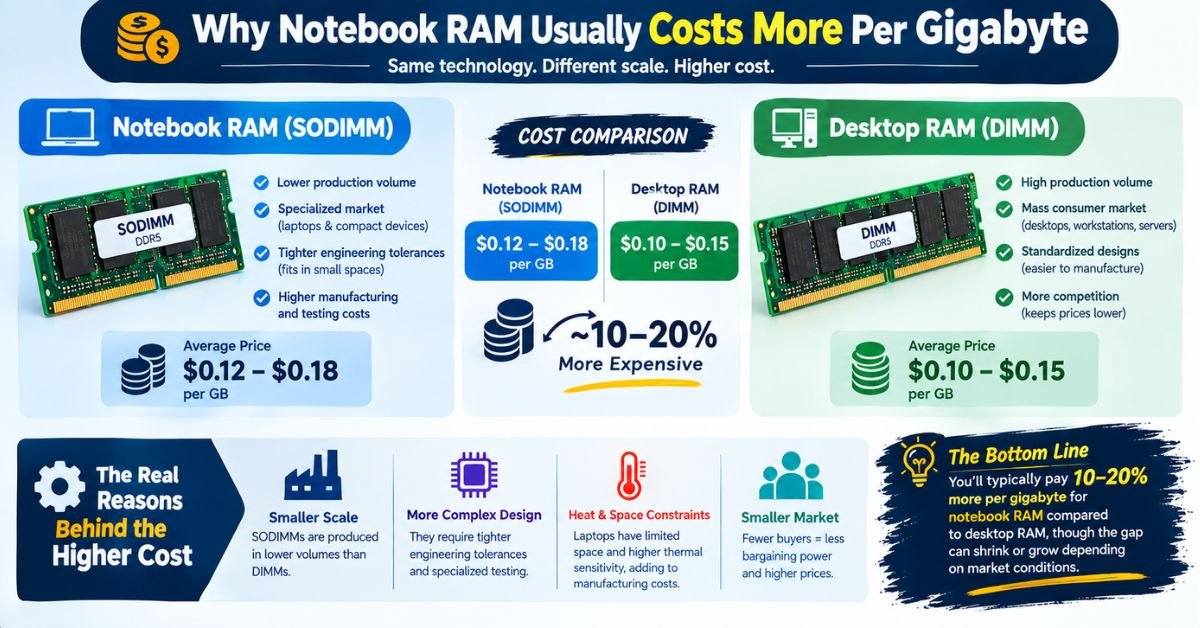
Manufacturers produce desktop DIMMs at a much higher volume. Desktop RAM has been the default consumer format for decades, and the manufacturing lines, testing infrastructure, and competitive market for it are enormous.
SODIMMs, by comparison, serve a smaller, more specialized market. Lower production volume plus tighter engineering tolerances (fitting into cramped, heat-sensitive spaces) pushes the price per gigabyte up.
Expect to pay roughly 10-20% more for equivalent notebook RAM capacity and speed compared to desktop RAM, though this gap narrows during oversupply periods in the memory market and widens during shortages.
Compatibility Checklist Before You Buy
Use this checklist every time you’re shopping for RAM, whether for a laptop or desktop:
- [ ] Confirm form factor: SODIMM for laptops, UDIMM (or RDIMM for some workstations) for desktops
- [ ] Match the generation: DDR4 and DDR5 are not interchangeable and use different pin counts and notch positions
- [ ] Check your motherboard’s or laptop’s maximum supported speed buying faster RAM than your system supports means it’ll just run at the system’s ceiling
- [ ] Verify maximum supported capacity some older systems cap out at 16GB or 32GB total, even with empty slots available
- [ ] Check single-sided vs. dual-sided modules some laptops only support single-sided sticks in certain slot combinations
- [ ] Confirm voltage compatibility this matters more on laptops, where the memory controller is tuned for a specific voltage range
- [ ] Buy in matched pairs for dual-channel mismatched sticks (different speed or timings) will downclock to the slower module’s spec
Notebook RAM vs Desktop RAM: Pros and Cons
Notebook RAM (SODIMM)
Pros:
- Fits the compact form factor laptops require
- Lower power draw helps battery life
- Available in modern capacities up to 48GB per stick
Cons:
- Costs more per gigabyte
- Fewer slots limit total capacity
- Increasingly soldered on premium/thin models, killing upgrade potential
- Lower ceiling on overclocking and peak speeds
Desktop RAM (DIMM/UDIMM)
Pros:
- Cheaper per gigabyte
- More slots allow higher total capacity (up to 128GB+ on consumer boards)
- Better cooling supports higher speeds and tighter timings
- Universally upgradeable no soldered configurations in standard desktops
Cons:
- Physically larger, not usable in compact builds
- Higher power draw, irrelevant for a plugged-in desktop but a non-starter for portable devices
- Requires opening the case, which some users find intimidating
Which Should You Care About? A Practical Decision Guide
If you’re buying a laptop: Prioritize checking upgradeability before purchase. If the model allows RAM upgrades, you can buy a lower-RAM configuration now and add more later, saving money upfront. If it’s soldered, buy the maximum RAM configuration you can afford on day one, because that’s what you’re stuck with for the machine’s life.
If you’re buying or building a desktop: RAM is one of the cheapest, highest-impact upgrades available. Unless you’re on an extreme budget, buy at least 32GB for general use in 2026, and lean toward faster speeds if your CPU and motherboard support them (check your motherboard’s QVL Qualified Vendor List for tested, guaranteed-compatible kits).
If you’re troubleshooting slow performance: Check whether you’re actually RAM-limited before spending money. Open Task Manager (Windows) or Activity Monitor (Mac) and watch memory usage under normal load. If it’s consistently pegged near 90-100%, more RAM will help. If memory usage sits comfortably below your total capacity, your bottleneck is likely the CPU or storage drive instead.
Frequently Asked Questions
Is desktop RAM the same as laptop RAM?
No. They use the same underlying memory technology (like DDR4 or DDR5), but the physical module is different. Laptop RAM comes in a smaller SODIMM format; desktop RAM comes in a larger DIMM/UDIMM format. Same “language,” different “shape.”
Can I use laptop RAM in a desktop computer?
No, not directly. A SODIMM stick won’t physically fit into a desktop’s DIMM slot — it’s shorter, has fewer pins, and the notch (the little gap that lines up with the slot) sits in a different position. There are SODIMM-to-DIMM adapter boards sold online, but they’re niche, not officially supported by most motherboard makers, and can introduce stability issues. Not recommended unless you have no other option.
Is 32GB RAM overkill for a laptop?
For most people, no — it’s actually a smart sweet spot in 2026. It’s overkill if you’re just browsing, streaming, and doing office work (16GB handles that fine). It’s not overkill if you’re running multiple browser tabs with heavy web apps, doing video/photo editing, running virtual machines, or gaming while streaming. Since many laptops have soldered or limited RAM slots, buying 32GB upfront is often cheaper long-term than trying to upgrade later.
Will laptop RAM fit in a desktop?
No — same answer as above. Different physical size, different pin count, different notch alignment. It’s a mechanical incompatibility, not just a performance mismatch.
Can I convert laptop RAM to desktop RAM?
Not in any practical sense. There’s no way to physically or electrically “convert” a SODIMM into a UDIMM — the memory chips themselves might be similar, but the module design, pin layout, and circuit board are built differently for each form factor. Your only real option is buying the correct RAM type for the system you’re upgrading.
