
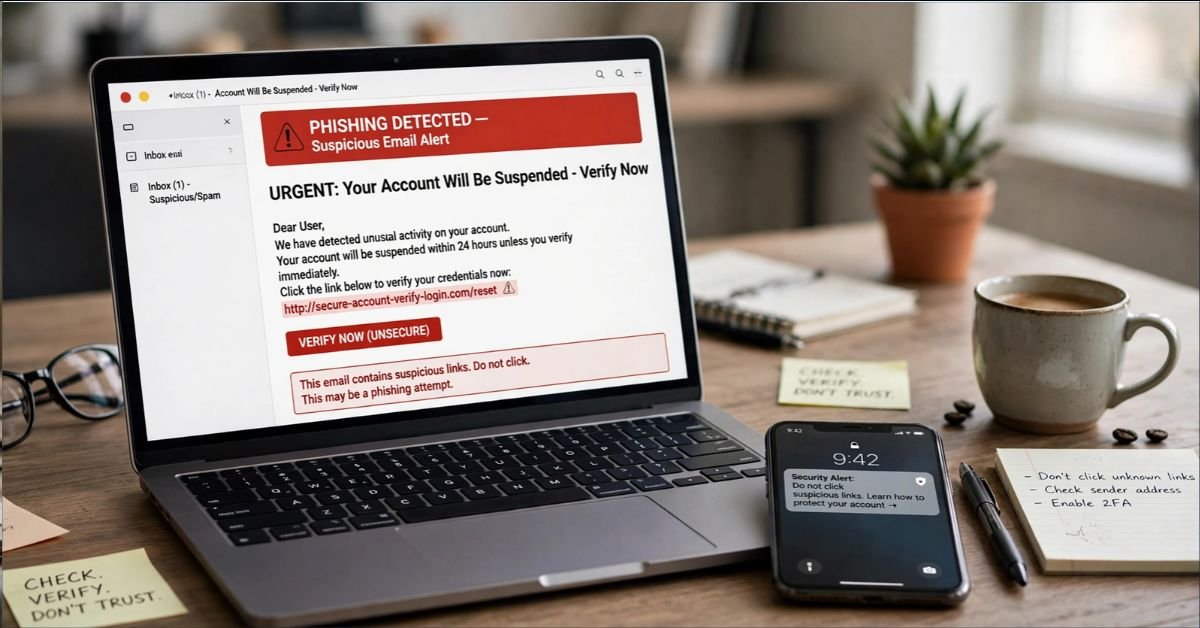
Phishing is a cyberattack where a criminal pretends to be someone you trust, such as your bank, your boss, or a delivery company, to trick you into handing over sensitive information or taking a harmful action. That action might be typing a password into a fake login page, opening a malicious attachment, or sending money to a fraudulent account.
Phishing is one of the most common methods cybercriminals use to steal credentials and gain unauthorized access to accounts and business systems. It works because it targets people, not software. A firewall can’t stop you from voluntarily typing your password into the wrong website.
This guide explains how phishing works, the main types, how to spot it, what to do if you’ve already clicked, and how to protect yourself and your business.
What Does “Phishing” Mean?
The word is a play on “fishing.” Attackers cast out a lure (an email, text, or call) and wait for someone to bite. The “ph” spelling traces back to early hacker culture and the 1990s, when attackers used fake messages to steal AOL account credentials.
The method hasn’t changed much since then. The packaging has. Today’s phishing messages use clean branding, correct grammar, and convincing urgency.
How Phishing Works, Step by Step
Most phishing attacks follow the same basic pattern.
- Research. The attacker picks a brand or person to impersonate. For targeted attacks, they study LinkedIn profiles, company websites, and social media.
- The lure. They send a message designed to trigger a fast emotional reaction: fear, curiosity, urgency, or greed.
- The hook. The message pushes you toward a link, an attachment, a phone number, or a reply.
- The capture. A fake login page records your credentials, malware installs in the background, or you send money or data voluntarily.
- The payoff. The attacker logs into your accounts, sells your data, drains funds, or uses your access to attack others.
The key detail: the attacker often uses your stolen credentials within minutes. Speed is part of the strategy.
Common Types of Phishing Attacks
Phishing isn’t just email anymore. Here’s how the main variants compare.
| Type | Delivery Method | Target | Typical Goal |
| Email phishing | Mass email | Anyone | Steal logins, deliver malware |
| Spear phishing | Personalized email | A specific person | Credential theft, network access |
| Whaling | Personalized email | Executives | Wire fraud, sensitive data |
| Smishing | SMS/text message | Mobile users | Link clicks, fake payments |
| Vishing | Phone call or voicemail | Anyone, often older adults | Payment or account details |
| Business email compromise (BEC) | Email from a spoofed or hijacked account | Finance and HR staff | Fraudulent wire transfers |
| Quishing | QR code in email, flyer, or parking meter | Anyone who scans | Redirect to fake login pages |
| Clone phishing | Copy of a real email with a swapped link | Previous recipients | Malware or credential theft |
Email Phishing
This is the classic version. The attacker sends thousands of near-identical messages pretending to be PayPal, Microsoft, Amazon, or the IRS. Most people ignore them. A small percentage click, and that’s enough to profit.
Spear Phishing and Whaling
Spear phishing is personalized. The email might mention your manager’s name, a real project, or a vendor you actually use. Whaling is the same tactic aimed at CEOs, CFOs, and other senior leaders, where one successful attack can unlock large sums.
Smishing and Vishing
Smishing uses text messages: a fake package delivery notice, a toll payment warning, or a bank fraud alert. Vishing uses voice calls, increasingly with spoofed caller ID and, in some cases, AI-generated voices that mimic a family member or executive.
Business Email Compromise
BEC attackers often skip malicious links entirely. They send a plain, believable email asking an employee to pay an invoice or change vendor bank details. Because there’s no malware to detect, security filters often miss it. The FBI’s Internet Crime Complaint Center consistently ranks BEC among the costliest cybercrime categories in the US.
Quishing
Attackers embed QR codes in emails or stick them over legitimate codes on posters and parking meters. Scanning one sends your phone to a fake page. Security tools struggle to scan images, which is why this method has grown.
Real-World Examples of Phishing Messages
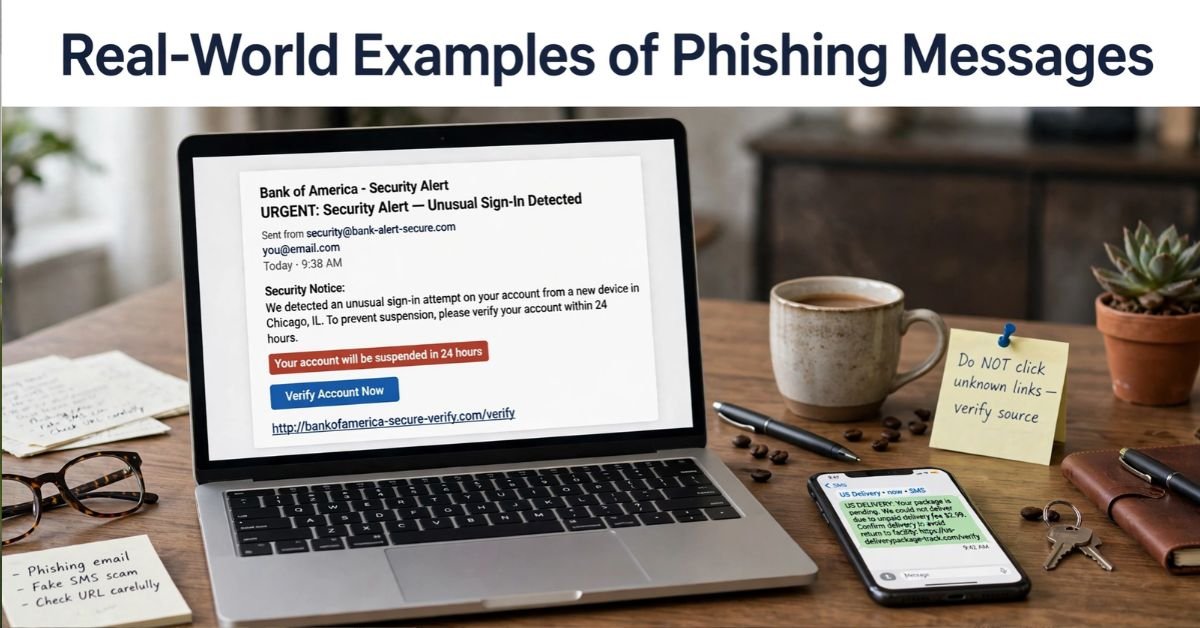
Seeing the patterns helps. Here are realistic examples.
The fake security alert: “Unusual sign-in detected on your Microsoft account. Verify your identity within 24 hours or your account will be suspended.” The link leads to a pixel-perfect copy of the Microsoft login page on a different domain.
The delivery text: “USPS: Your package could not be delivered due to an incomplete address. Update here to avoid return.” The link asks for your card number to pay a “redelivery fee” of a dollar or two. The real cost is your full card details.
The boss request: An email that appears to come from your CEO says, “I’m in a meeting and can’t talk. I need you to buy gift cards for a client. Reply with the codes.” The display name is right, but the email address is a free webmail account.
The invoice swap: A vendor you really work with emails updated bank details. The email thread looks authentic because the attacker has compromised the vendor’s mailbox.
How to Spot a Phishing Attempt
No single sign proves a message is phishing, but several together should stop you. Use this checklist.
- Urgency or threats. “Act now,” “account suspended,” “final notice.”
- Mismatched sender. The display name says “Chase Bank,” but the address is support@chase-secure-help.com.
- Suspicious links. Hover over (or long-press) the link. If the destination doesn’t match the claimed company, don’t click.
- Unexpected attachments. Especially ZIP files, HTML files, or Office documents asking you to “enable macros” or “enable content.”
- Requests for credentials or payment details. Legitimate companies rarely ask for passwords or full card numbers by email or text.
- Generic greetings. “Dear customer” instead of your actual name (though targeted attacks will use your name).
- Unusual payment methods. Gift cards, cryptocurrency, wire transfers, or a sudden change to bank details.
- Slightly off branding or wording. Though AI tools have made this a weaker signal than it used to be.
Don’t rely on typos alone. Modern phishing messages are often grammatically clean. Focus on the request itself: is someone pressuring you to act fast, click a link, or move money?
Check the Link Before You Click
Lookalike domains are the attacker’s favorite trick. Watch for:
- Character swaps: paypa1.com (number 1 instead of the letter l)
- Extra words: amazon-security-update.com
- Wrong top-level domain: microsoft.co instead of microsoft.com
- Subdomain tricks: login.microsoft.evil-site.com, where the real domain is evil-site.com
What to Do If You Clicked a Phishing Link
Don’t panic, but move quickly. Here’s a practical order of operations.
If you only clicked the link (no information entered):
- Close the page.
- Run a full scan with your security software.
- Clear your browser cache and review recently installed extensions.
If you entered a password:
- Change that password immediately from a different, trusted device if possible.
- Change it anywhere else you reused it. Attackers test stolen credentials on other sites.
- Turn on multi-factor authentication if it isn’t already enabled.
- Check account activity, including sign-in history, forwarding rules in email, and recent transactions.
- Sign out of all sessions in your account settings.
If you entered card or bank details:
- Call the number on the back of your card and report the compromise.
- Ask for a replacement card and review recent charges.
- Consider placing a fraud alert or credit freeze with the credit bureaus.
If you downloaded an attachment or installed something:
- Disconnect from the internet.
- Run a full malware scan, or use your IT department’s incident process at work.
- If it’s a work device, report it to IT right away. Fast reporting limits the damage, and most security teams would much rather hear about a mistake early.
If you sent money:
- Contact your bank immediately and ask about a wire recall or payment reversal.
- File a report at the FBI’s Internet Crime Complaint Center (ic3.gov).
- Report to the FTC at ReportFraud.ftc.gov.
How to Report Phishing
Reporting helps block the attack for others.
- Email: Forward phishing emails to reportphishing@apwg.org (Anti-Phishing Working Group), and use the “Report phishing” button in Gmail, Outlook, or Yahoo.
- Text messages: Forward to 7726 (SPAM), then delete the message.
- Government: Report to the FTC at ReportFraud.ftc.gov.
- Impersonated brand: Most large companies have a dedicated abuse address, usually listed on their security page.
- Work: Use your company’s reporting button or contact your IT or security team.
How to Protect Yourself From Phishing
Good habits beat any single tool. Here’s what actually works.
Habits That Matter Most
- Go to the source. Instead of clicking a link in a message, type the company’s address into your browser or open its official app.
- Verify by a second channel. If your “boss” emails an odd request, call or message them on a known number.
- Slow down. Phishing depends on speed. A 30-second pause defeats most attacks.
- Never share one-time codes. No legitimate support agent will ask you to read out a verification code.
Technical Protections
- Use a password manager. It fills credentials only on the correct domain, so a lookalike site gets nothing. That alone makes it a strong phishing defense.
- Enable multi-factor authentication (MFA). Better still, use passkeys or hardware security keys (FIDO2). These are phishing-resistant because they won’t authenticate on a fake site. SMS codes are better than nothing but can be intercepted or socially engineered.
- Keep devices updated. Patches close the holes that malicious attachments exploit.
- Use built-in spam and malware filtering. Don’t disable it.
MFA Methods Compared
| MFA Method | Phishing Resistance | Convenience | Notes |
| SMS codes | Low | High | Vulnerable to SIM swaps and code-sharing scams |
| Authenticator app (TOTP) | Medium | Medium | Codes can still be entered on a fake site |
| Push approval | Medium | High | Vulnerable to “MFA fatigue” spam approvals |
| Passkeys | High | High | Bound to the real website |
| Hardware security key | High | Medium | Strongest option; keep a backup key |
Phishing Protection for Businesses
Small and midsize businesses get hit as often as large ones, usually with fewer defenses.
Pros of a layered approach: it catches attacks that any single tool would miss. Cons: it takes setup time and ongoing training.
- Email authentication: Configure SPF, DKIM, and DMARC so attackers can’t easily spoof your domain.
- Advanced email filtering: Add sandboxing and link-rewriting for attachments and URLs.
- Phishing-resistant MFA on email, finance, and admin accounts first.
- Payment verification rules: Require a callback to a known number before changing vendor bank details or sending large wires.
- Regular simulated phishing tests, followed by coaching rather than punishment.
- An easy reporting button and a clear “no blame” policy so employees speak up fast.
- Least-privilege access, so one compromised account can’t reach everything.
Is Phishing Illegal?
Yes. In the US, phishing can be prosecuted under federal wire fraud, identity theft, and computer fraud laws, plus a range of state statutes. Penalties can include prison time and large fines. Enforcement is difficult, though, because many attackers operate across borders.
Why Phishing Keeps Working
Attackers exploit human psychology. Authority, urgency, fear, and curiosity short-circuit careful thinking. Generative AI has also made it cheaper to write polished, personalized messages at scale, and voice cloning has made phone scams more convincing.
The takeaway isn’t that you’re careless if you get fooled. Skilled professionals fall for phishing too. The goal is to build habits and systems that limit the damage when it happens.
Quick Reference: Phishing Dos and Don’ts
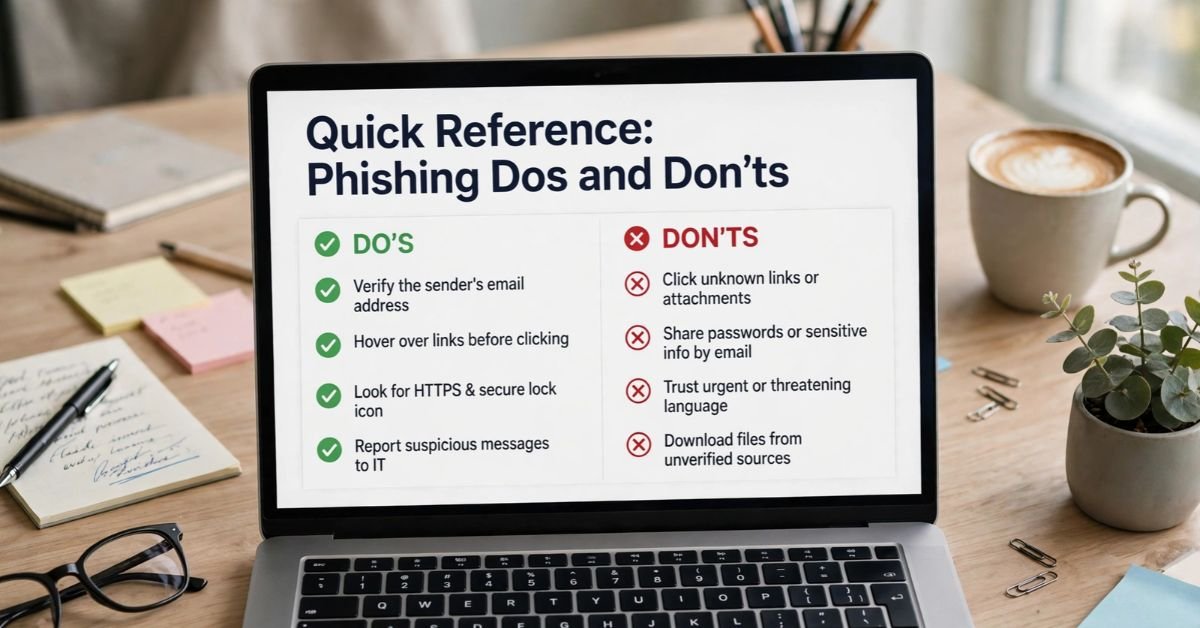
| Do | Don’t |
| Type official web addresses yourself | Click links in unexpected messages |
| Use a password manager and passkeys | Reuse passwords across sites |
| Verify unusual requests by phone | Reply to the suspicious message itself |
| Report suspicious messages | Delete them without telling IT at work |
| Change passwords fast after a slip-up | Wait to see if anything happens |
FAQs
How do I check if I was phished?
Look for signs that someone else has been in your accounts. Check sign-in history for unfamiliar devices or locations, review email forwarding rules and recent transactions, and see whether your password suddenly stopped working. If you entered anything on a suspicious page, assume you were phished and change that password right away, then turn on multi-factor authentication.
What are 7 signs of phishing?
- Urgent or threatening language
- A sender address that doesn’t match the company
- Links whose real destination differs from the displayed text
- Unexpected attachments
- Requests for passwords, codes, or card details
- Generic greetings like “Dear customer”
- Unusual payment requests, such as gift cards, crypto, or new bank details
What happens if you just open a phishing email?
In most cases, nothing serious. Opening the email alone is rarely dangerous, though it can confirm to the sender that your address is active. The real risk starts when you click a link, open an attachment, or reply. If you opened one, don’t click anything inside it, then report it and delete it.
What are some examples of phishing?
- A “Microsoft” alert saying your account will be suspended unless you verify it
- An email from your “CEO” asking you to buy gift cards
- A vendor sending new bank details for an invoice
- A fake PayPal receipt for a purchase you never made
- A call from your “bank” asking you to read out a verification code
Can you give me some examples of phishing text messages?
- “USPS: Your package couldn’t be delivered. Update your address here to avoid return.”
- “Your bank account has been locked. Verify your identity now.”
- “You have an unpaid toll balance. Pay today to avoid a fine.”
- “Unusual login detected on your account. Tap to secure it.”
- “Hi, this is Mom. I lost my phone. Can you send money to this number?”
What are three signs of phishing?
Urgency, a suspicious sender or link, and a request for sensitive information. If a message has all three, treat it as a scam.
How can you tell if a message is phishing?
Don’t judge the message by how it looks. Verify it through another route. Contact the company using a number or website you already trust, and never use the contact details inside the message itself. If the sender claims to be a coworker or relative, call them directly.
What is the biggest red flag for a phishing email?
Pressure to act immediately, especially when the message asks for a login, payment, or code. Scammers rely on speed because a calm, careful reader is much harder to fool.
What are the five main types of phishing attacks?
- Email phishing: mass messages sent to many people
- Spear phishing: personalized messages aimed at one person
- Whaling: attacks aimed at executives
- Smishing: phishing by text message
- Vishing: phishing by phone call
SEE MORE INFORMATIVE ARTICLES:
- GRC in South Africa: Governance, Risk & Compliance
- Cybersecurity Journalist Profile Evaluation Criteria: A Practical 100-Point Scorecard
- Cyber Security Course in Hyderabad: Career-Focused Training & Placement Guarantee
- Bridging the Advanced Cloud and Security Gap Without Bloating Internal Payroll
